Last updated: July 2026
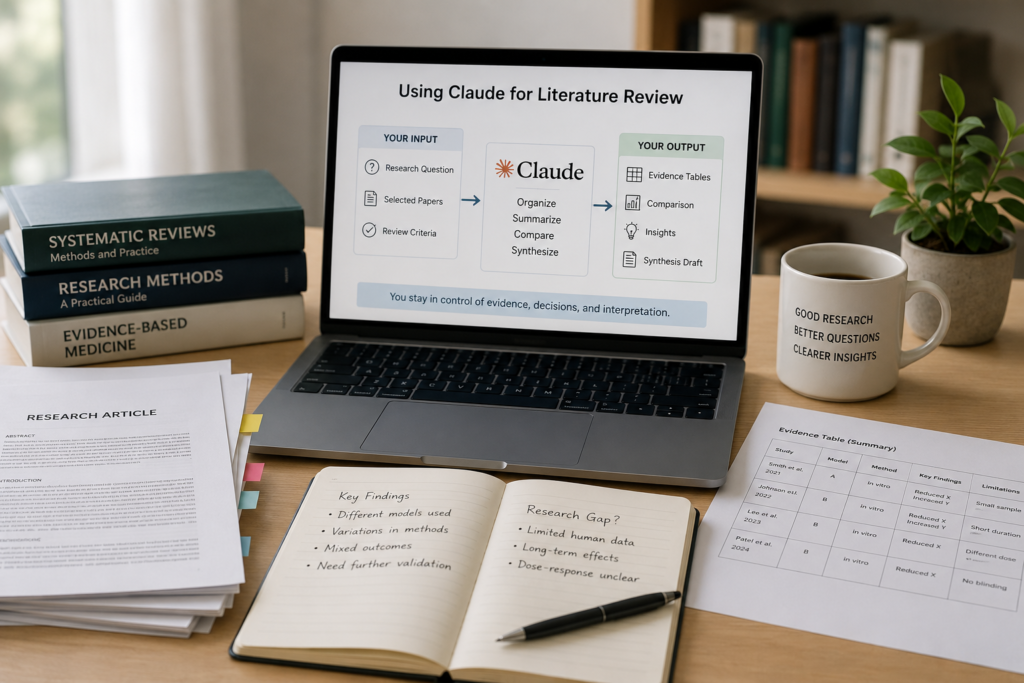
Claude can help with a literature review, but probably not in the way most people first imagine.
It is not a replacement for PubMed, Google Scholar, Scopus, Web of Science, or a reference manager.
Where it becomes genuinely useful is after you have collected the papers you want to review.
At that point, Claude can help you understand what each study did, compare methods across papers, organize conflicting findings, and turn scattered notes into a clearer structure.
That is where it adds the most value.
Finding papers, understanding papers, and evaluating evidence are separate tasks. Claude can support each of them to some degree, but it should not control the entire process.
The search strategy still belongs to you.
So does citation verification.
And the final scientific judgment must remain yours.
Use Claude to organize the literature—not to become the literature.
The Short Answer
Claude becomes much more useful once a few things are already in place:
- a defined review question
- a selected group of relevant papers
- a consistent way to extract information
- a clear idea of what you want to compare
Once those pieces are in place, it can help you summarize studies, build evidence tables, compare methods, organize contradictory results, and shape a literature-review draft.
What it cannot do is tell you with certainty that you have found every relevant paper, that a research gap is real, or that one study is more trustworthy than another.
A practical workflow looks like this:
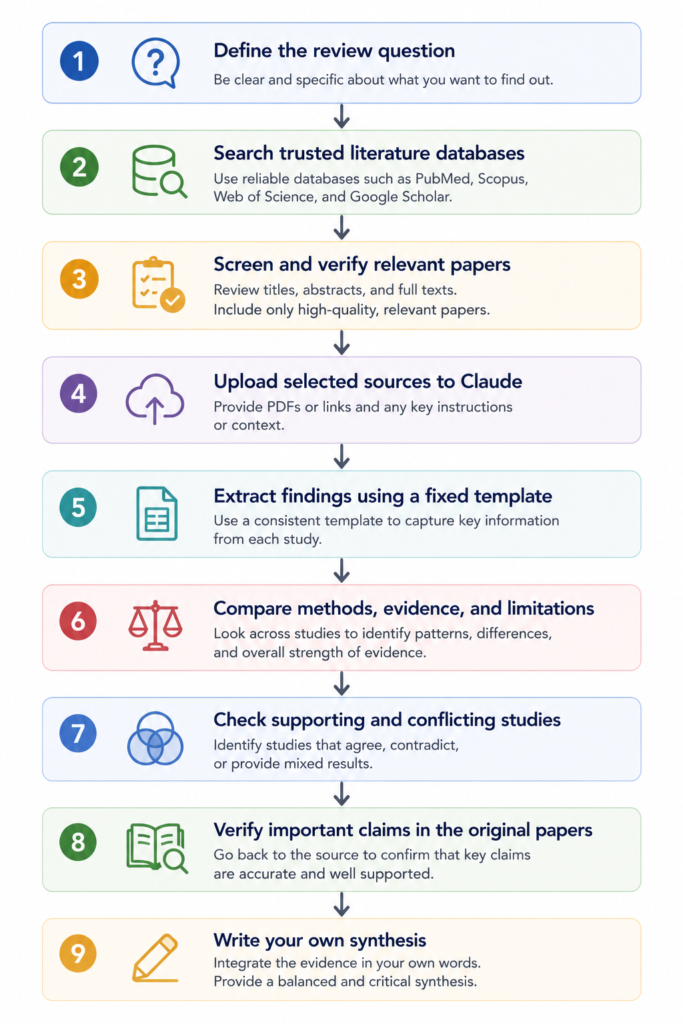
In practice, Claude is most useful in the middle of this workflow.
It should not become the search engine, evidence source, and final reviewer all at once.
What Claude Does Best
Claude is at its best when you already have the papers you want to review.
Instead of searching for new studies, it helps you understand, compare, and organize the ones you have already collected.
You might use it to compare experimental models, explain an unfamiliar method, separate direct findings from author interpretation, or turn several pages of notes into a structured table.
For example, this is a strong request:
“Using only the five uploaded papers, compare the experimental models, methods, findings, and limitations.”
A weaker request would be:
“Tell me the most important papers in this field and cite them.”
The second sounds convenient, but it often creates more work later. Claude may miss important studies, rely on incomplete information, or produce references that do not support the claim.
When the papers are already in front of it, the task becomes much more controlled.
What Claude Still Cannot Tell You
Even when Claude sounds confident, there are limits to what it can actually know.
It cannot know whether you have found every relevant paper.
It cannot confirm that a research gap truly exists.
It cannot decide whether two studies are comparable without you checking the methods.
And it cannot replace your own scientific judgment.
This is where it becomes easy to overtrust the output.
A response can sound balanced, coherent, and technically polished while still being incomplete.
In literature review, smooth writing can make uncertain evidence look more settled than it really is.
Claude Is Not a Literature Database
A literature database retrieves indexed scholarly records.
Claude interprets and reorganizes information.
Those are different jobs.
Use PubMed, Google Scholar, Semantic Scholar, Web of Science, Scopus, or field-specific databases to find papers.
Use Scite, ResearchRabbit, Connected Papers, or Litmaps when you want citation context or network exploration.
Use Zotero, EndNote, or Mendeley to manage references.
Then bring the selected material into Claude for comparison and synthesis.
Some Claude environments may include web research, Projects, Artifacts, scientific connectors, or database access.
Where Claude Fits in the Process
One way to think about Claude is as a middle-stage tool.
It is less reliable at the beginning, when the goal is complete retrieval, and at the end, when the final interpretation has to be defended.
| Literature-review stage | Claude’s role | Researcher’s role |
|---|---|---|
| Define the question | Refine wording | Decide scope and importance |
| Search the literature | Suggest keywords | Build and document the search |
| Screen papers | Help apply draft criteria | Make inclusion decisions |
| Extract evidence | Populate a template | Verify important fields |
| Compare studies | Organize differences | Decide which differences matter |
| Identify gaps | Generate candidate gaps | Confirm them through broader searching |
| Draft synthesis | Improve structure and clarity | Write and defend the interpretation |
| Verify citations | Assist with formatting | Confirm every source independently |
Thinking about it this way makes it easier to decide when Claude should—and should not—be involved.
Let Claude handle the organization.
You stay responsible for the evidence.
Step 1: Start With a Narrow Question
A vague question produces vague synthesis.
Compare: “Review the literature on inflammation.”
with: “Compare evidence that Protein X regulates IL-1β production in macrophages under sterile inflammatory conditions.”
The second question gives you a defined molecule, outcome, cell type, and biological context.
That makes paper selection more consistent and later comparisons more meaningful.
Claude can help sharpen the wording, but it should not decide the scope for you.
If you are not sure where to start, try:
“Rewrite this review question so that the population or model, exposure, outcome, and biological context are clear. Do not broaden the scope.”
For a systematic or scoping review, Claude may also help draft a PICO-, PECO-, or concept-based framework.
The final eligibility criteria still need manual review.
Step 2: Search the Literature Elsewhere
A common temptation is to ask Claude for the entire literature in one prompt.
That is usually where things start to go wrong.
Begin with established databases instead.
For biomedical topics, PubMed may be the natural starting point. Broader questions may require Google Scholar, Scopus, Web of Science, Semantic Scholar, or a field-specific database.
Keep a record of:
- databases searched
- search dates
- search strings
- filters
- inclusion criteria
- exclusion criteria
- duplicate-removal methods
Claude can still help with synonyms and related terms.
A simple way to ask is:
“Generate alternative terms for macrophage activation, sterile inflammation, and IL-1β secretion. Group them by concept. Do not produce citations.”
You can then turn those terms into a search strategy and test it in the database itself.
Claude cannot guarantee that the syntax is correct for every platform, and it cannot guarantee high recall.
Step 3: Build a Clean Paper Set
If you have ever uploaded a large pile of papers at once, you have probably seen the problem.
More input does not always produce a better answer.
A mixed paper set may contain duplicate evidence, irrelevant studies, reviews mixed with primary experiments, incompatible methods, and papers that only loosely relate to the question.
Before using Claude, sort the literature into sensible groups.
For example:
- primary mechanistic studies
- observational studies
- clinical studies
- reviews
- contradictory studies
- methods papers
This sounds like a small organizational step, but it often changes the quality of the review.
A review article and a primary experiment should not be treated as if they provide the same kind of evidence.
Step 4: Extract Evidence With a Fixed Template
One mistake I see quite often is asking for a general summary of every paper.
The result may look neat, but it becomes difficult to compare studies because each summary emphasizes different details.
A fixed extraction table works better.
| Field | What to extract |
|---|---|
| Citation | Verified reference |
| Research question | What was tested? |
| Model or population | Cell line, animal model, cohort, or dataset |
| Method | Main experimental or analytical approach |
| Key finding | What was directly observed? |
| Author interpretation | What did the authors conclude? |
| Limitation | What weakens the inference? |
| Relevance | Why does it matter to the review question? |
One approach I have found useful is to give Claude a strict instruction:
“Using only the uploaded paper, complete the evidence table below. Separate direct findings from the authors’ interpretation. If a field is not reported, write ‘Not reported.’ Do not infer missing information.”
The final sentence matters more than it may seem.
Without it, Claude may fill empty fields with information that sounds plausible but is not actually stated.
After the table is generated, check the details that shape the argument:
- sample size
- model system
- controls
- endpoint definitions
- statistical tests
- subgroup analyses
- negative findings
- stated limitations
Step 5: Compare the Same Variables Across Papers
A literature review should not read like a row of isolated paper summaries.
Its value comes from comparison.
Claude can help by placing every paper into the same structure.
Useful variables include:
- population or model
- intervention or exposure
- dose
- timing
- endpoint
- controls
- statistical approach
- main finding
- limitation
- relevance to the review question
If you are not sure how to phrase the request, you could say:
“Compare these papers using the same variables. Do not merge studies that use different endpoints. Highlight where the studies are directly comparable and where they are not.”
This becomes especially important in biology.
Cytokine mRNA, intracellular protein, and secreted cytokine may describe related processes, but they are not interchangeable outcomes.
A weak synthesis flattens those differences.
A strong one keeps them visible.
Step 6: Treat Contradictory Findings as a Methods Problem First
At first glance, two studies may seem to disagree.
Often, the disagreement becomes less mysterious once you compare the methods.
Claude can help organize differences in:
- cell type
- population
- dose
- timing
- endpoint
- inclusion criteria
- statistical model
- technical conditions
- sample size
- definitions
But those explanations should remain provisional until you check the papers.
Here is an example that usually works well:
“List the methodological differences that could explain the conflicting findings. For each explanation, cite the relevant information from the supplied papers. Mark unsupported explanations as inference.”
That last phrase forces a useful separation between what the papers show and what Claude is proposing.
Real Research Scenario: Two Papers That Disagree
Imagine that you are reviewing whether Protein X increases inflammatory cytokine production.
One paper reports a strong increase after Protein X activation.
Another reports no significant effect.
A weak workflow would be:
Ask Claude which paper is correct
        ↓
Accept the more confident explanation
        ↓
Write the conclusion
A stronger workflow would be:
Read the main figures
        ↓
Compare models, doses, timing, endpoints, and controls
        ↓
Use Claude to organize the differences
        ↓
Check later supporting and contrasting studies
        ↓
Verify the interpretation in the original papers
        ↓
Write a qualified synthesis
Suppose one study measured cytokine mRNA after two hours in an immortalized cell line.
The other measured secreted protein after twenty-four hours in primary human macrophages.
The results may look contradictory, but the experiments are not equivalent.
Claude can make those differences easier to see.
What it cannot do is decide how much biological weight each difference deserves.
That part still requires domain knowledge.
Step 7: Turn Verified Notes Into Themes
Once the paper-level notes are checked, Claude can help move from extraction to synthesis.
You might group the literature into:
- mechanistic evidence
- observational evidence
- clinical outcomes
- contradictory findings
- methodological limitations
- unresolved questions
If you have done a few literature reviews, you have probably run into the same problem: the notes are complete, but the structure is not obvious.
In that situation, try:
“Group the verified evidence notes into themes. Explain why each paper belongs in a theme. Do not introduce new studies or claims.”
The resulting themes can become section headings or paragraph plans.
Still, read the grouping critically.
Claude may cluster papers because they use similar language even when the underlying experiments answer different questions.
Step 8: Use Research Gaps as Leads, Not Conclusions
Claude is good at spotting patterns.
That does not mean every missing comparison is a genuine research gap.
An apparent gap may exist because relevant papers were not uploaded, the search was incomplete, another field uses different terminology, or the question has already been studied under a different name.
One pattern I have noticed is that AI-generated gaps often sound more novel than they really are.
A better request is:
“List findings consistently supported across the supplied papers. Then list inconsistent findings, variables that differ across studies, and questions explicitly described as unresolved. Separate documented gaps from inferred gaps.”
This gives you two categories.
Documented gaps
These are questions the authors themselves describe as unresolved.
Inferred gaps
These are questions Claude derives from the pattern of available studies.
Inferred gaps are useful for brainstorming.
They are not ready to be presented as established gaps until you search more broadly.
Step 9: Verify the Citation and the Claim
Never add a reference to a manuscript simply because Claude produced it.
A citation may look correct and still be nonexistent, incomplete, or attached to the wrong statement.
Check references using DOI records, PubMed, publisher pages, Crossref, or institutional databases.
Then go one step further.
Confirm that the cited paper actually supports the sentence.
A real reference can still be used incorrectly.
It is an easy mistake to make, especially when a citation looks familiar.
The habit worth keeping is:
Verify the paper, then verify the claim–paper relationship.
Step 10: Use Claude to Edit, Not to Inflate
Once the evidence is checked and the argument is planned, Claude can help with revision.
This is where it often saves the most time.
You can ask it to look for weak transitions, repetitive phrasing, uneven paragraph structure, or places where conflicting evidence is not represented fairly.
At this stage, I would give Claude a fairly strict instruction:
“Revise this section for clarity and flow. Do not add references, strengthen claims, change causal language, or remove limitations.”
That protects against claim inflation.
For example:
“Protein X was associated with increased cytokine expression.”
should not automatically become:
“Protein X drives inflammatory cytokine production.”
The second sentence sounds stronger.
It also makes a causal claim that the study may not support.
In scientific writing, smoother is not always better.
More accurate is better.
Can Claude Help With a Systematic Review?
Yes, but only with selected parts of the process.
Claude may help refine search concepts, draft screening criteria, pilot extraction forms, classify abstracts, check consistency, summarize included papers, or generate analysis code.
A systematic review, however, involves much more than summarization.
It may require reproducible searches, duplicate screening, documented exclusions, deduplication, protocol adherence, risk-of-bias assessment, PRISMA-compliant reporting, and transparent records.
In practice, this is where Claude should remain firmly in an assistant role.
It should not replace Covidence, Rayyan, EPPI-Reviewer, or DistillerSR when formal review management is required.
Because integrations, supported formats, and plan access may change, verify the current details in Anthropic’s official documentation before relying on them.
Claude Features That May Help
You do not need every Claude feature to use it for literature review.
For most researchers, the basic workflow—providing selected papers, using a consistent extraction format, and checking the output manually—is more important than any single product feature.
Some optional tools may make the process easier:
| Feature | Possible use in literature review |
|---|---|
| Claude Research | Multi-source web investigation and synthesis |
| Claude Projects | Keeping papers, instructions, and review criteria together |
| Claude Artifacts | Maintaining evidence tables, outlines, and comparison matrices |
| Connectors and MCP | Connecting Claude to external tools or knowledge sources |
| Claude Science | Linking literature work with code, data analysis, or scientific computing |
Verification note: Feature availability, file limits, source coverage, connector support, pricing, plan requirements, and regional access may change. Check the current Anthropic documentation before building a workflow around any specific feature.
These tools may make the workflow more convenient, but they do not change who is responsible for verifying the evidence.
Common Mistakes
Before using Claude for a literature review, watch for these common mistakes:
- asking it to find the entire literature
- treating individual summaries as synthesis
- trusting references because they look correctly formatted
- asking Claude to decide which study is correct
- uploading a large, poorly selected paper set
- replacing formal review software with a general AI assistant
Most of these problems come from giving Claude responsibility for a task that still requires a documented search process or scientific judgment.
Limitations of Using Claude for Literature Review
| Limitation | Why it matters |
|---|---|
| Hallucinated references | Incorrect citations may enter a manuscript |
| Incomplete retrieval | Relevant studies may be missed |
| Loss of methodological nuance | Controls, assumptions, and negative results may disappear |
| Overconfident synthesis | Mixed evidence may sound like consensus |
| Blurred finding and interpretation | Direct results and inference may become mixed |
| Privacy concerns | Sensitive or unpublished material may be exposed |
| Poor reproducibility | Prompts, files, and corrections may not be documented |
Do not upload unpublished manuscripts, confidential peer-review material, patient data, proprietary datasets, or sensitive institutional documents without checking the relevant policies.
For serious academic work, keep an AI-use log.
Record the prompts, uploaded files, model or product used, retrieval date, search queries, inclusion criteria, corrections, and edits made after the AI output.
Frequently Asked Questions
Can Claude perform a literature review?
Claude can assist with summarization, comparison, evidence extraction, thematic organization, and drafting. It should not replace the search strategy, citation verification, or scientific judgment.
Can Claude search PubMed or Google Scholar?
Some Claude environments may offer web research or scientific connectors.
Can Claude generate accurate citations?
It may generate correct citations from supplied sources, but it can also produce incorrect or mismatched references. Verify every citation independently.
How many papers can I upload?
This depends on the current product, plan, supported formats, file size, and context limits. Because upload limits, supported formats, and context limits may change, check the latest Anthropic documentation before uploading a large paper set.
Can Claude help with a systematic review?
It can assist with selected tasks, but it should not replace formal screening, risk-of-bias assessment, review-management software, or transparent reporting.
How do I prevent Claude from inventing references?
Give it verified papers, tell it to use only supplied sources, and check every citation yourself.
Can I upload unpublished research?
Only after checking institutional, contractual, ethical, and data-governance policies. Do not assume that uploading sensitive material is permitted.
Should I disclose Claude use in a paper or thesis?
Disclosure requirements vary by journal, institution, funder, and type of use. Because disclosure requirements vary by journal, institution, funder, and type of use, check the policy that applies to your work before submitting a paper or thesis.
Key Takeaways
Claude is most useful after relevant papers have been identified and before the final synthesis is written.
Give it verified sources and a consistent extraction template.
Use it to compare methods, organize evidence, and turn checked notes into themes.
Keep direct findings, author interpretation, and Claude’s own inference separate.
Verify important citations, claims, and research gaps before using them in academic work.
Most importantly:
Use Claude to organize the literature—not to become the literature.
Continue Learning
AI for Literature Review
- AI Literature Review Workflow
- How to Use Scite for Literature Review
- How to Read Research Papers with AI
- Elicit Review
- NotebookLM Review