Last updated: August 2026 • 12 min read
Quick Verdict
| Category | Rating |
|---|---|
| Reading Scientific Papers | ★★★★★ |
| Comparing Multiple Papers | ★★★★★ |
| Literature Review Support | ★★★★☆ |
| Knowledge Organization | ★★★★★ |
| Scientific Writing | ★★★☆☆ |
| Reference Management | ★★☆☆☆ |
| Evidence Evaluation | ★★★☆☆ |
| Overall | ★★★★☆ (4.5/5) |
Best For
- Reading several related research papers together
- Comparing findings across studies
- Preparing for journal clubs or lab meetings
- Building topic-specific research notebooks
- Asking questions about papers you have already collected
- Early-stage literature synthesis
Less Suitable For
- Discovering new literature
- Formal systematic reviews
- Statistical analysis
- Reference management
- Replacing direct reading of important papers
- Uploading sensitive unpublished research without checking current privacy and institutional policies
Bottom Line
NotebookLM is most useful to me after I have already found the papers I want to read.
Its strongest feature is not AI-generated writing.
It is the ability to work interactively with a specific collection of sources.
Instead of asking:
“What does AI know about this topic?”
I can ask:
“What do these papers actually say, where do they agree, and where do they differ?”
That makes NotebookLM especially useful during the reading and synthesis stage of research.
My simplest description is:
ResearchRabbit helps me find papers. NotebookLM helps me work with the papers I already have.
The Research Problem NotebookLM Actually Solves
Every research project eventually creates the same problem.
At first, finding papers feels difficult.
Then suddenly I have too many.
A folder that started with three PDFs becomes:
- Review articles
- Landmark papers
- Recent experimental studies
- Supplementary files
- Notes
- Papers I vaguely remember reading
- Papers I saved but never opened
At that point, finding information is no longer the main problem.
The problem becomes:
How do I keep track of what these papers collectively say?
A traditional PDF reader is good for reading one paper.
A reference manager is good for storing papers.
NotebookLM is useful for something slightly different:
Interacting with a focused group of papers as a collection.
That is the role I think researchers should evaluate it for.
How I Actually Use NotebookLM for Research
I do not upload an entire literature library and ask:
“Summarize everything.”
That usually defeats the purpose.
Instead, I build a notebook around a specific research question.
A typical workflow looks like this:
Select papers → Build a focused notebook → Ask comparison questions → Identify disagreements or gaps → Return to the original papers → Save useful conclusions
The important part is that NotebookLM sits in the middle.
It does not replace literature discovery.
It does not replace critical reading.
It helps me move more efficiently between the two.
Step 1: Build a Focused Source Library
The quality of a NotebookLM notebook depends heavily on what goes into it.
If I upload thirty papers covering loosely related topics, the notebook may contain plenty of information but very little conceptual structure.
So I usually begin with a much smaller collection.
For a new topic, I might start with something like:
- 2–3 recent review articles
- A few landmark experimental papers
- Several recent studies directly related to my question
This is not a universal rule.
It is simply a practical starting point.
The goal is to create a source collection that answers one reasonably focused biological question.
For example, instead of creating a notebook called:
Cancer Immunology
I would rather create something like:
Mechanisms of CD8 T-cell exhaustion in solid tumors
or:
Metabolic regulation of macrophage activation
The narrower the question, the easier it becomes to ask meaningful comparison questions later.
How Many Papers Should I Upload?
This is one of the questions I think researchers should ask before using NotebookLM seriously.
The answer is not:
“As many as possible.”
More papers can provide more information.
But more sources also create more heterogeneity.
In practice, I think about source count in terms of research stage, not a fixed ideal number.
Around 5 Papers: Initial Comparison
A small notebook is useful when I am trying to understand a narrow question.
For example:
- One or two reviews
- Three or four primary papers
At this scale, I can easily ask:
What mechanisms are shared across these papers?
Which experiment provides the strongest evidence for this model?
Where do these authors disagree?
What methods were used to reach different conclusions?
A small source set is also easier to verify manually because I can quickly return to each paper.
Around 10–20 Papers: Focused Literature Review
Once I understand the field better, I may expand the notebook.
At this stage, I might include:
- Foundational papers
- Recent primary studies
- Different experimental models
- Papers with conflicting interpretations
This is where NotebookLM becomes especially useful for comparison.
Instead of reading every paper again, I can ask questions such as:
Which findings appear consistently across these studies?
Which mechanisms are only supported by one or two papers?
Which experimental systems produce different conclusions?
What limitations appear repeatedly?
The exact number is not important.
What matters is whether the papers still belong to the same conceptual problem.
30+ Papers: Organization Becomes More Important
A larger notebook can still be useful, but I would not assume that adding more papers automatically improves the analysis.
Once the source collection becomes large, I need to think more carefully about:
- Topic boundaries
- Paper types
- Experimental models
- Dates
- Review vs. primary literature
- Whether different subquestions should become separate notebooks
If thirty papers actually represent three different research questions, I would rather build three focused notebooks than one giant notebook.
So I do not think there is a magic number.
My practical rule is:
Upload enough papers to represent the question—not every paper you have collected.
Step 2: Do Not Ask “Summarize These Papers”
This is probably the biggest difference between useful and mediocre NotebookLM workflows.
A broad prompt such as:
“Summarize these papers.”
usually produces a broad answer.
That may be helpful if I have not read anything yet.
But it does not take advantage of having multiple sources in the notebook.
I get much more value from comparison questions.
For example:
Which biological mechanisms are supported by at least several of these studies?
Where do these papers disagree?
Which conclusions depend on different experimental models?
What limitations appear repeatedly?
Which findings are based mostly on in vitro experiments?
Which claims are supported by animal models?
Are there papers that interpret similar results differently?
What questions remain unresolved across these sources?
These questions force the notebook to function as a research reading tool rather than a summarizer.
Step 3: Use NotebookLM to Find Relationships Between Papers
This is where NotebookLM becomes more interesting than asking a general chatbot about a scientific topic.
Suppose I upload several papers about T-cell exhaustion.
One study may emphasize transcription factors.
Another may focus on metabolic dysfunction.
Another may study epigenetic stability.
Another may investigate checkpoint receptors.
Reading these papers individually can make each mechanism feel independent.
But asking across the collection:
How do these papers explain the relationship between transcriptional, metabolic, and epigenetic regulation of T-cell exhaustion?
can help reveal how the pieces fit together.
That does not mean the AI has discovered a new biological mechanism.
It means the tool can help me organize information that is distributed across multiple papers.
For literature reading, that is genuinely useful.
Step 4: Use Source Grounding as a Starting Point for Verification
NotebookLM’s most important feature for research is that its responses are grounded in the sources I provide.
That makes it different from asking a general AI model to explain a topic from memory.
When NotebookLM gives me a statement, I can trace that answer back to my uploaded materials.
This improves traceability.
But source grounding does not automatically make the interpretation scientifically correct.
A source-grounded answer can still:
- Oversimplify a paper
- Ignore experimental limitations
- Combine conclusions more confidently than the authors did
- Miss contradictory details
- Treat weak evidence and strong evidence similarly
So I use NotebookLM citations as a navigation tool.
If it gives me an interesting conclusion, I go back to the relevant paper.
Then I check:
- The figure
- The methods
- The experimental model
- The controls
- The authors’ wording
- The limitations
This is where the researcher has to take over again.
Source grounding improves traceability. It does not replace scientific judgment.
How I Verify Important NotebookLM Answers
If a NotebookLM answer matters to my interpretation of the literature, I do not stop at the generated response.
I use a simple verification process.
1. Identify the source
Which paper is supporting the claim?
2. Open the relevant section
I check the actual passage or figure.
3. Ask what the experiment really demonstrates
Does the experiment show:
- Correlation?
- Necessity?
- Sufficiency?
- Association?
- A mechanistic relationship?
These are not interchangeable.
4. Check whether another paper disagrees
If the notebook contains conflicting results, I want to understand why.
Differences might come from:
- Cell type
- Organism
- Disease model
- Experimental method
- Dose
- Time point
- Sample size
5. Write my own conclusion
NotebookLM can help organize evidence.
The final interpretation should still be mine.
How I Would Use NotebookLM for a Literature Review
Suppose I am beginning a focused review on:
Metabolic regulation of exhausted CD8 T cells in tumors
I would not begin with fifty PDFs.
I would build the notebook gradually.
First pass
I might upload:
- 2 recent reviews
- 3–5 influential primary papers
Then ask:
What metabolic pathways are most consistently discussed?
Which mechanisms appear to be central?
Which terminology should I understand before reading further?
At this stage, I am building a map.
Second pass
Once I understand the topic, I might add more targeted papers.
For example:
- Mitochondrial dysfunction
- Glucose metabolism
- Lipid metabolism
- Hypoxia
- Nutrient competition in the tumor microenvironment
Then I can ask:
Which metabolic defects are presented as causes of exhaustion and which are described as consequences?
Which interventions restore T-cell function?
Which findings have only been demonstrated in mouse models?
Now the notebook is helping me synthesize rather than merely understand.
Third pass
Finally, I would focus on disagreement and uncertainty.
For example:
Which conclusions are not consistent across studies?
Which mechanisms are strongly supported?
Which claims depend heavily on one experimental model?
What research gaps remain?
That is much closer to the way I actually want AI to help with a literature review.
Not:
“Write the review for me.”
But:
“Help me see the structure of the evidence so I can evaluate it myself.”
A Practical Prompt Set I Actually Find Useful
These are the kinds of prompts I think make NotebookLM valuable for research.
For Understanding
Explain the central biological question shared by these papers.
What background concepts do I need to understand before reading these sources in detail?
What terminology appears repeatedly across these papers?
For Comparison
Create a comparison of the experimental models used in these studies.
Which mechanisms are supported across multiple papers?
Where do the authors disagree?
Which findings appear model-specific?
For Critical Reading
What limitations do the authors acknowledge?
Which conclusions appear stronger than the experimental evidence directly demonstrates?
Which claims are supported by direct functional experiments?
What alternative interpretations appear across these papers?
I would still verify the answer myself, especially for the last two questions.
For Research Gaps
Which questions remain unresolved across these papers?
What contradictions exist between the studies?
Which mechanisms have been proposed but not directly tested?
What experiments would help distinguish between competing explanations?
These prompts are useful for brainstorming.
They are not a substitute for evaluating whether a proposed research gap is genuinely novel.
Where NotebookLM Is Most Useful
Reading Several Papers Together
This is probably its strongest use case.
Individual papers are easy to read separately.
The harder task is remembering how they connect.
NotebookLM can help surface those relationships.
Preparing for Journal Club
For journal club, I often need to understand:
- The main question
- Key experiments
- Related literature
- Limitations
- Points worth discussing
NotebookLM can help generate a first map before I go back and inspect the figures carefully.
Entering an Unfamiliar Subfield
If I already have several relevant papers but do not understand the field well, NotebookLM can help explain concepts using the exact sources I plan to read.
This is especially useful because the explanation remains tied to that source collection.
Comparing Experimental Models
One of the more useful research questions is often not:
What did each paper conclude?
but:
Why did these papers reach different conclusions?
NotebookLM can help me compare differences in:
- Cell type
- Animal model
- Disease context
- Method
- Intervention
- Experimental endpoint
That can make conflicting literature easier to interpret.
Building a Project-Specific Knowledge Base
For a long-term project, a notebook can become a focused workspace around one biological problem.
I can return to the same source collection later and ask new questions as the project develops.
That is more useful to me than treating the tool as a one-time summarizer.
Where NotebookLM Is Less Useful
Literature Discovery
NotebookLM works best after I already have relevant papers.
If my problem is:
“What papers should I read?”
I would use a literature search or discovery tool first.
NotebookLM becomes more useful once the question changes to:
“What do these papers collectively tell me?”
Evaluating Scientific Quality
NotebookLM can tell me what authors reported.
It cannot reliably decide whether the study was actually well designed.
A weak study can still produce a perfectly clear AI summary.
Researchers still need to examine:
- Experimental controls
- Statistics
- Replication
- Methods
- Sample selection
- Alternative explanations
Systematic Reviews
NotebookLM can support reading and synthesis.
It does not replace systematic-review methodology.
A formal review still requires:
- Reproducible searches
- Clear inclusion and exclusion criteria
- Documentation
- Study-quality assessment
- Structured screening
Those are methodological tasks, not document-chat tasks.
Reference Management
NotebookLM is not where I would manage my citations.
I would still use a dedicated reference manager such as Zotero or Paperpile for:
- Citation metadata
- Bibliographies
- Citation styles
- Long-term library organization
NotebookLM and reference managers solve different problems.
NotebookLM vs Other Research Tools
I think the easiest way to understand NotebookLM is to define its job clearly.
| Tool | Best Role |
|---|---|
| Perplexity | Understand an unfamiliar topic before searching deeply |
| ResearchRabbit | Discover related papers |
| Google Scholar / PubMed | Search scientific literature |
| NotebookLM | Read and compare papers already collected |
| Elicit | Compare evidence across larger groups of studies |
| Scite | Inspect citation context |
| Zotero | Manage references |
| Claude / ChatGPT | Reasoning, drafting, and writing support |
For me, NotebookLM answers:
“What do these sources say when I look at them together?”
That is its niche.
And I think the tool becomes more useful once I stop expecting it to do everything else.
A Note on Audio Overviews
NotebookLM can also generate audio-style discussions based on uploaded sources.
I see this as a supplementary feature rather than a core research tool.
It can be useful for:
- Reviewing material while commuting
- Reinforcing concepts after reading
- Getting a broad refresher before a meeting
But I would not use an audio overview as a substitute for reading an important paper.
Scientific details often live in:
- Figures
- Methods
- Supplementary data
- Statistical analysis
Those cannot be replaced by a conversational overview.
Privacy and Unpublished Research
This matters more for researchers than for ordinary users.
Before uploading:
- Unpublished manuscripts
- Confidential collaborations
- Patient-related information
- Proprietary datasets
- Sensitive experimental results
I would check both:
- Google’s current NotebookLM privacy and data-handling policies
- My institution’s policies regarding external AI tools
A tool being useful does not automatically mean every research document belongs in it.
How NotebookLM Fits Into My Research Workflow
I do not think of NotebookLM as the center of my entire research workflow.
It has one main job:
Help me read and synthesize a focused collection of sources.
The broader process looks more like:
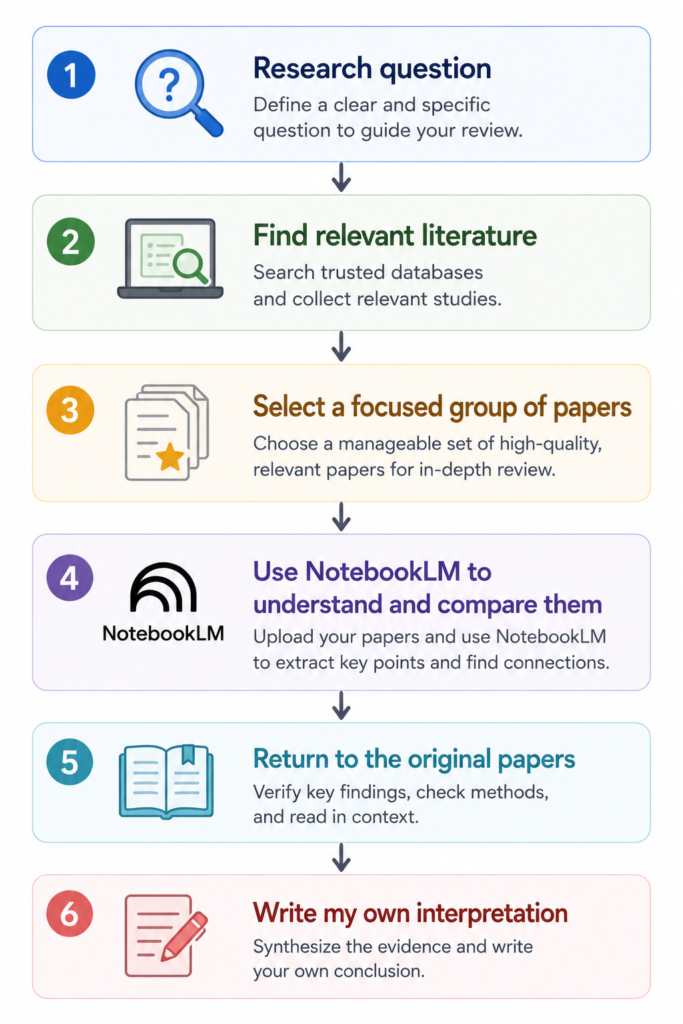
That final step matters.
NotebookLM can accelerate understanding.
It should not outsource the thinking that makes research valuable.
Key Takeaways
- NotebookLM is most useful after I have already collected relevant papers.
- I get better results from focused notebooks than from uploading everything at once.
- There is no universal ideal number of papers.
- Around 5 papers can be useful for initial comparison.
- A larger 10–20 paper collection can work well for a focused review once the topic is clearer.
- With 30+ papers, organization and topic boundaries become increasingly important.
- Comparison questions are usually more useful than simply asking for summaries.
- Source grounding improves traceability, but it does not guarantee correct interpretation.
- Important conclusions still need to be checked against the original papers.
- NotebookLM should help researchers think through literature, not think instead of them.
The principle I would use is:
Upload enough papers to represent the question—not every paper you have collected.
And my broader rule is:
Use NotebookLM to see relationships between papers. Return to the papers themselves to decide what those relationships mean.
Frequently Asked Questions
Is NotebookLM good for researchers?
Yes.
I think it is particularly useful for researchers who already have a group of relevant papers and want to understand, compare, and organize them more efficiently.
How many research papers should I upload to NotebookLM?
There is no universal ideal number.
I prefer starting with a focused collection rather than uploading everything available. For an initial comparison, a small set of roughly five papers may be enough. For a more developed topic, I may work with 10–20 related papers. Larger collections can still be useful, but they require stronger organization. These are practical working ranges, not scientifically validated limits.
Can NotebookLM replace reading scientific papers?
No.
It can help identify important sections, compare findings, and explain difficult concepts. But researchers still need to inspect the original figures, methods, results, and limitations before relying on important conclusions.
Can NotebookLM replace a literature review?
No.
It can support literature reading and synthesis, but it does not replace systematic searching, study-quality assessment, or scientific interpretation.
Does source grounding mean NotebookLM cannot hallucinate?
No.
Grounding responses in uploaded documents can improve traceability, but errors, oversimplification, and misinterpretation are still possible. That is why I treat source links as a path back to the evidence rather than proof that every generated statement is correct.
Final Verdict
NotebookLM is not the AI tool I would use to discover an entire field.
It becomes useful after the discovery stage.
Once I have collected a focused group of papers, it helps me ask better questions about them.
Not just:
“What does this paper say?”
but:
“What do these papers agree on?”
“Where do they disagree?”
“Which mechanisms are supported across multiple studies?”
“Which conclusions depend on different models?”
“What questions are still unresolved?”
That is much closer to how researchers actually work with literature.
Its biggest advantage is not that it can summarize PDFs.
Many AI tools can do that.
Its advantage is that it allows me to interrogate a specific collection of scientific sources as a connected body of literature.
But the final scientific judgment still belongs to the researcher.
NotebookLM helps me navigate the literature I have collected. It does not decide what the evidence means for me.
For reading, comparing, and organizing scientific papers, that makes it one of the more practical AI tools in my research workflow.
Overall Rating: ★★★★☆ (4.5/5)
Further Reading
Related Articles
ResearchRabbit Review (2026) →
Need to find more papers before building a NotebookLM source collection? ResearchRabbit is better suited for literature discovery and citation-network exploration.
Perplexity Review for Researchers →
Entering a completely unfamiliar topic? Perplexity can help you understand the terminology and research landscape before you begin collecting papers.
How to Use NotebookLM for Literature Reviews →
A more detailed workflow for using NotebookLM during literature review and research synthesis.
Best NotebookLM Prompts for Researchers →
Practical prompts for comparing papers, identifying disagreements, and exploring research gaps.
Elicit Review (2026) →
When your question shifts from reading a focused collection to comparing evidence across studies, Elicit can serve a different role.
Scite Review (2026) →
Want to understand how later studies discuss an important paper? Scite focuses on citation context.