Last updated: July 2026 • 10 min read
Quick Answer
If you’re using NotebookLM for literature reviews, the most effective time to introduce it is after you’ve collected your papers but before you begin writing.
NotebookLM is not designed to replace critical reading. Instead, it helps researchers organize, compare, and question their literature more efficiently. Used correctly, it can significantly reduce the time spent navigating large collections of papers while keeping your workflow grounded in your own sources.
Introduction
Finding papers is easier than ever.
Making sense of them is another story.
A single project can quickly grow into dozens of review articles, original studies, supplementary files, and personal notes. Most researchers eventually reach the same point: there is simply too much information to process efficiently.
That’s exactly the stage where NotebookLM can make a real difference.
Unlike general-purpose AI assistants, NotebookLM works primarily with the papers you upload. Rather than generating answers from general knowledge, it helps you explore your own literature by asking questions, identifying patterns, and organizing information across multiple documents.
That distinction matters.
The goal of a literature review is not simply to summarize papers. It is to understand how different studies relate to one another, where evidence agrees or conflicts, and which questions remain unanswered.
This guide shows exactly how to integrate NotebookLM into that process.
Rather than reviewing features, we’ll focus on a practical workflow that researchers can apply immediately.
Before You Start
Before opening NotebookLM, make sure you already have the following:
- ✅ A clearly defined research question
- ✅ Start with around 5–15 closely related papers. (the ideal number depends on paper length and your workflow; current NotebookLM limits may change and should be verified before large projects)
- ✅ PDF versions of your papers or other supported source documents (supported file types are subject to change and should be verified)
- ✅ A specific research topic rather than a broad field
For example:
❌ Cancer
✅ Ferroptosis in colorectal cancer
❌ Immunology
✅ T-cell exhaustion during chronic viral infection
NotebookLM performs best when your sources are closely related and address the same scientific question.
Uploading unrelated papers usually produces scattered answers that are difficult to interpret.
Step 1: Collect the Right Papers
One mistake I’ve seen repeatedly is that researchers upload papers before deciding what question they’re actually trying to answer.
Before using it, you first need a carefully selected set of papers.
A practical workflow might look like this:
Google Scholar / PubMed → Find one or two landmark papers → Expand the literature with ResearchRabbit → Select the most relevant papers → Upload them to NotebookLM
The quality of NotebookLM’s answers depends almost entirely on the quality of the papers you upload.
For most literature reviews, it is better to upload a focused collection of closely related papers than a large library covering multiple topics.
As a starting point, consider including:
- One or two recent review articles
- Several influential primary research papers
- Recent studies that build on the same question
Avoid uploading papers from unrelated research areas simply because they contain similar keywords.
NotebookLM is most useful when all uploaded documents contribute to answering the same research question.
Step 2: Upload Papers to NotebookLM
Once you’ve selected your papers, upload them as a single NotebookLM notebook.
At this stage, resist the temptation to upload everything you’ve collected.
Uploading your entire downloads folder might feel productive.
In practice, it usually makes NotebookLM less useful.
Instead, think of each notebook as representing one research question.
For example:
Notebook A
Single-cell RNA sequencing in colorectal cancer
Notebook B
Ferroptosis in liver cancer
Keeping notebooks focused makes the responses more coherent and easier to interpret.
It also reduces the risk of mixing unrelated concepts across different research topics.
Step 3: Ask Better Questions
This is where most researchers either unlock NotebookLM’s full potential—or barely scratch the surface.
Many beginners start with questions like:
❌ Summarize this paper.
The answer is often useful, but limited.
Instead, ask questions that encourage comparison, critical thinking, and scientific interpretation.
For example:
Understanding the paper
- What is the main research question?
- What are the authors’ primary conclusions?
- Which experiments provide the strongest evidence?
Critical evaluation
- What are the major limitations of this study?
- Which conclusions are strongly supported, and which remain uncertain?
- What assumptions do the authors make?
Comparing multiple papers
- Compare this paper with the previous studies in my notebook.
- Which findings are consistent across these papers?
- Where do the studies disagree?
- Which methodological differences might explain these conflicting results?
Finding research gaps
- Which important questions remain unanswered?
- What future experiments do these papers suggest?
- Which areas have limited evidence?
Building literature notes
- Create a structured summary of the evidence.
- Organize the findings by biological mechanism.
- Group the papers according to their experimental approach.
- List the recurring themes discussed across these studies.
The quality of NotebookLM’s output depends less on the AI itself and more on the quality of the questions you ask.
A good prompt encourages analysis.
A great prompt encourages scientific thinking.
Step 4: Build Literature Notes
By this point, you’ve already asked questions, compared papers, and identified the most important findings.
Now it’s time to organize what you’ve learned.
This is one of the stages where NotebookLM can save the most time.
Rather than keeping dozens of disconnected summaries, use NotebookLM to build structured literature notes that are easy to revisit throughout your project.
A simple framework works well for most topics:
| Section | Example Question |
|---|---|
| Background | Why was this study conducted? |
| Methods | Which model was used? |
| Findings | What evidence is strongest? |
| Limitations | What remains uncertain? |
| Future Questions | What should be studied next? |
Instead of creating a separate summary for every paper, try organizing notes around research questions.
This makes it much easier to compare evidence across studies later.
Step 5: Connect NotebookLM to Your Research Workflow
NotebookLM works best when it is part of a larger research workflow.
Rather than treating it as an all-in-one solution, think of it as the stage where you understand the literature before moving on to evidence synthesis and writing.
A practical workflow might look like this:
ResearchRabbit → NotebookLM → Elicit → Claude → ZoteroEach tool serves a different purpose.
- ResearchRabbit helps you discover relevant papers.
- NotebookLM helps you understand those papers.
- Elicit helps compare evidence across multiple studies before you begin writing.
- Claude helps transform your notes into clear scientific writing.
- Zotero keeps your references organized throughout the project.
The workflow is simple because each tool focuses on what it does best.
Real Research Example
Imagine you’re beginning a literature review on single-cell RNA sequencing in colorectal cancer.
After collecting several review articles and primary studies, you upload them into NotebookLM.
Instead of asking for a general summary, you ask:
Which findings appear consistently across these studies?
NotebookLM identifies several recurring themes.
You then ask:
Which experiments provide the strongest evidence for these conclusions?
The answers immediately highlight the studies worth reading first.
Next, you ask:
What limitations are mentioned repeatedly across these papers?
Instead of discovering those limitations one paper at a time, NotebookLM helps you identify common patterns across the literature.
By the end of the session, you have something much more useful than a collection of summaries.
You have a structured set of literature notes that can be expanded into a review article, research proposal, or manuscript.
Common Mistakes
NotebookLM is remarkably useful, but many researchers fail to get the most out of it because of a few common mistakes.
I made this mistake myself.
At one point, I uploaded papers from several loosely related topics into the same notebook. The answers quickly became less focused, and unrelated concepts started appearing together.
NotebookLM performs best when every document contributes to answering the same research question.
Mixing unrelated topics often leads to vague or confusing answers.
Asking only for summaries
Simple summaries rarely provide the greatest value.
Questions that encourage comparison, critical thinking, and evaluation produce much more useful responses.
Trusting NotebookLM without verification
NotebookLM should help you navigate your literature.
It should never replace reading the original papers.
Always verify important claims directly from the source documents.
Ignoring the methods section
Many scientific disagreements arise from differences in methodology rather than conclusions.
Whenever NotebookLM identifies conflicting findings, return to the methods section before drawing conclusions.
Uploading too many papers
More documents do not necessarily improve the quality of answers.
Smaller, focused collections usually produce clearer and more reliable results.
Best NotebookLM Prompts
The quality of NotebookLM’s answers depends heavily on the quality of your questions.
Instead of treating NotebookLM as a summarization tool, use prompts that encourage analysis.
| ❌ Instead of | ✅ Try |
|---|---|
| Summarize this paper | Which figure provides the strongest evidence? |
| Explain this study | What are the major limitations of this study? |
| What is this about? | Compare these findings with the other papers in this notebook. |
| Give me a summary | Which conclusions remain uncertain? |
Why? This question forces NotebookLM to focus on evidence rather than description.
Understanding
- What is the main research question?
- What are the authors trying to demonstrate?
- Which conclusions are best supported by the data?
Comparison
- Compare these papers and identify areas of agreement.
- Which findings appear consistently across multiple studies?
- Which conclusions remain controversial?
Critical Thinking
- What are the major limitations of these studies?
- Which assumptions appear throughout the literature?
- Which claims require stronger evidence?
Research Gaps
- Which important questions remain unanswered?
- What future experiments would strengthen the current evidence?
- Which areas appear underexplored?
Writing Support
- Organize these papers into literature review sections.
- Group findings by biological mechanism.
- Create a structured outline for a review article.
- Identify logical transitions between research topics.
Final Workflow
The workflow I recommend looks like this:
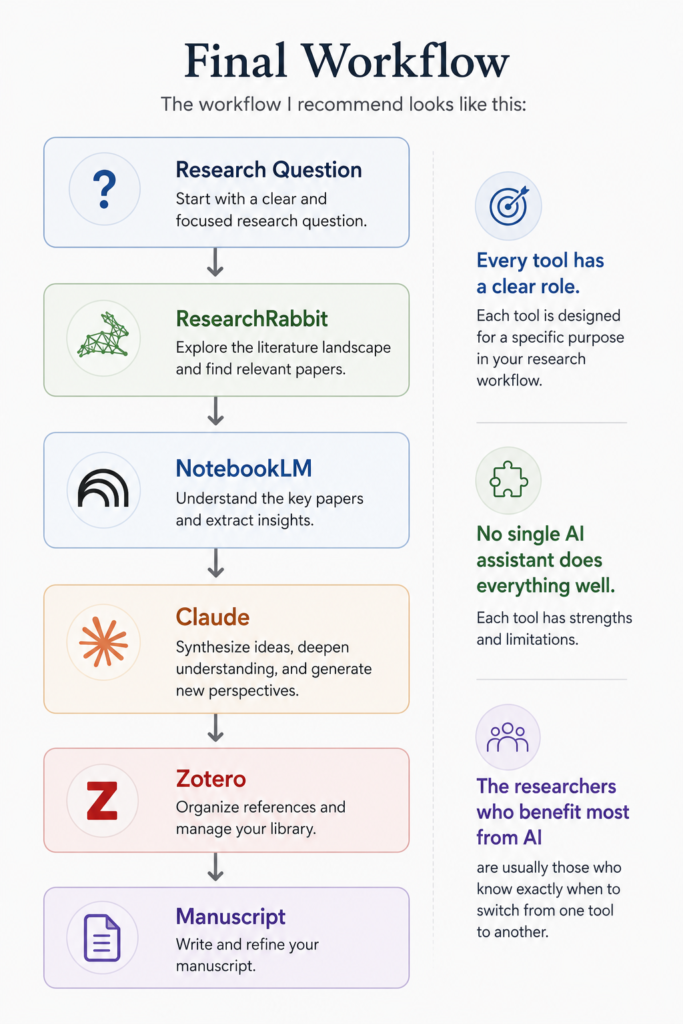
Every tool has a clear role.
No single AI assistant does everything well.
The researchers who benefit most from AI are usually those who know exactly when to switch from one tool to another.
Final Thoughts
NotebookLM isn’t designed to think for researchers.
It’s designed to help researchers think more clearly about their literature.
It won’t replace careful reading or scientific judgment. But used thoughtfully, it can make the process of understanding complex literature far less overwhelming.
Further Reading
If you’d like to explore NotebookLM in more detail, the following official resources are worth reading:
- NotebookLM Official Website – Product overview and latest features
- NotebookLM Help Center – User guides and documentation
- Google AI Blog – Product announcements and updates
Note: Current features, supported file types, upload limits, and pricing may change over time. Verify these details on the official website before relying on them for long-term workflows.
Related Articles
ResearchRabbit Review (2026) →
Still collecting papers? ResearchRabbit can help you discover influential papers before you begin reading them in NotebookLM.
Elicit Review (2026) →
Once you’ve organized your literature in NotebookLM, Elicit can help compare evidence across multiple studies and identify broader research patterns.
Scite Review (2026) →
Want to know whether a paper has been supported or challenged by later research? Scite helps you evaluate citation context before relying on important scientific claims.