Last updated: July 2026 • 11 min read
Quick Answer
Claude works best after you’ve already done the scientific thinking.
It is most useful for improving clarity, structure, and readability—not for generating scientific conclusions. Think of Claude as an editor rather than a co-author.
Why Scientific Writing Is So Difficult
Most research papers are not difficult to write because the science is weak.
They are difficult because turning complex ideas into clear, logical prose takes time.
After weeks or months of experiments, many researchers know exactly what they want to say. The challenge is expressing those ideas in a way that is concise, coherent, and easy for others to follow.
This is where Claude becomes genuinely useful.
Not because it can think like a scientist.
But because it can help researchers communicate their thinking more effectively.
This guide focuses on that role: using Claude to improve scientific writing without replacing scientific judgment.
Before You Open Claude
Before asking Claude to edit your writing, make sure you already have:
- ✅ Your own first draft
- ✅ Literature notes or supporting references
- ✅ Figures, tables, or results ready
- ✅ A clear goal for what you want to improve
For example:
❌ Write my Discussion section.
✅ Improve the clarity and flow of this Discussion while preserving the scientific meaning.
The difference matters.
Claude is at its best when improving existing writing, not creating scientific arguments from scratch.
Claude should improve scientific writing.
The science itself should remain yours.
Where Claude Fits Into the Research Workflow
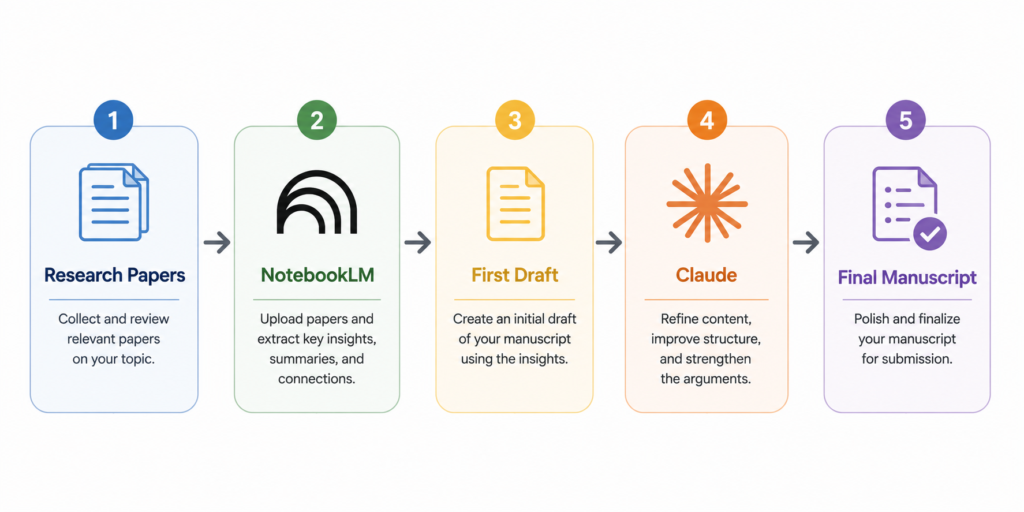
Claude is not the first tool I open during a research project.
By the time I use it, I’ve already found the literature, read the papers, and organized my notes.
A typical workflow looks like this:
ResearchRabbit → NotebookLM → Claude → Final Editing → SubmissionEach tool has a different job.
ResearchRabbit helps discover relevant papers.
NotebookLM helps understand and organize them.
Claude helps turn those ideas into writing that is clearer, more concise, and easier to read.
That’s where I find it most useful—not as a scientist, but as an editor.
Step 1: Write the First Draft Yourself
One of the biggest mistakes researchers make is opening Claude before they’ve written anything themselves.
It can be tempting to ask:
❌ Write my Introduction.
The result may sound polished, but it rarely reflects your scientific reasoning.
A much better approach is to write the first draft yourself—even if it’s rough.
Then ask Claude to improve it.
For example:
✅ Improve this Introduction while preserving the scientific meaning.
That small change completely shifts Claude’s role.
Instead of generating science, it helps communicate the science you’ve already developed.
Step 2: Give Claude a Clear Editing Task
Claude performs much better when it has a specific job to do.
Vague requests usually produce vague revisions.
Instead of asking:
Improve this paragraph.
Try giving Claude one clear objective at a time.
For example:
- Improve clarity while preserving the scientific meaning.
- Improve the logical flow between paragraphs.
- Reduce repetition without removing important details.
- Rewrite this paragraph for a Nature-style audience.
- Improve readability without changing the interpretation.
Treat Claude like an editor.
The more specific your instructions, the more useful its suggestions become.
Best Claude Prompts for Scientific Writing
The prompts below are the ones I return to most often when revising manuscripts.
Rather than asking Claude to write new scientific content, each prompt focuses on improving communication while keeping the underlying science unchanged.
Prompt 1 — Improve Clarity
Rewrite this paragraph to improve clarity while preserving the scientific meaning.
Why it works
Many first drafts contain ideas that are scientifically correct but difficult to follow.
This prompt helps simplify the language without changing the underlying message.
Best used for
- Introductions
- Discussions
- Literature reviews
Prompt 2 — Improve Logical Flow
Improve the transitions between these paragraphs without changing the scientific content.
Why it works
Scientific writing often becomes difficult to read because ideas are presented in the right order but connected poorly.
This prompt focuses on transitions rather than rewriting everything.
Best used for
- Review articles
- Thesis chapters
- Long discussions
Prompt 3 — Make the Writing More Concise
Reduce unnecessary words while preserving every important scientific detail.
Why it works
Many manuscripts become stronger after removing repetition rather than adding new text.
This prompt helps tighten the writing without oversimplifying the science.
Best used for
- Abstracts
- Introductions
- Results
Prompt 4 — Improve the Discussion
Rewrite this Discussion to improve clarity while keeping the scientific interpretation unchanged.
Why it works
The Discussion is often where complex ideas become difficult to communicate.
Claude can improve readability while leaving the scientific reasoning intact.
Best used for
- Discussion sections
- Review articles
Prompt 5 — Improve the Abstract
Rewrite this abstract so it is clearer and more concise without changing the meaning.
Why it works
Abstracts have limited space.
Improving sentence structure often has a greater impact than adding more information.
Best used for
- Manuscript submission
- Conference abstracts
Prompt 6 — Reviewer Responses
Rewrite this response to the reviewer in a professional and constructive tone while preserving the original meaning.
Why it works
Reviewer responses should be clear, respectful, and direct.
Claude is particularly useful for improving tone without changing the scientific argument.
Best used for
- Revision letters
- Reviewer responses
Editing vs Writing
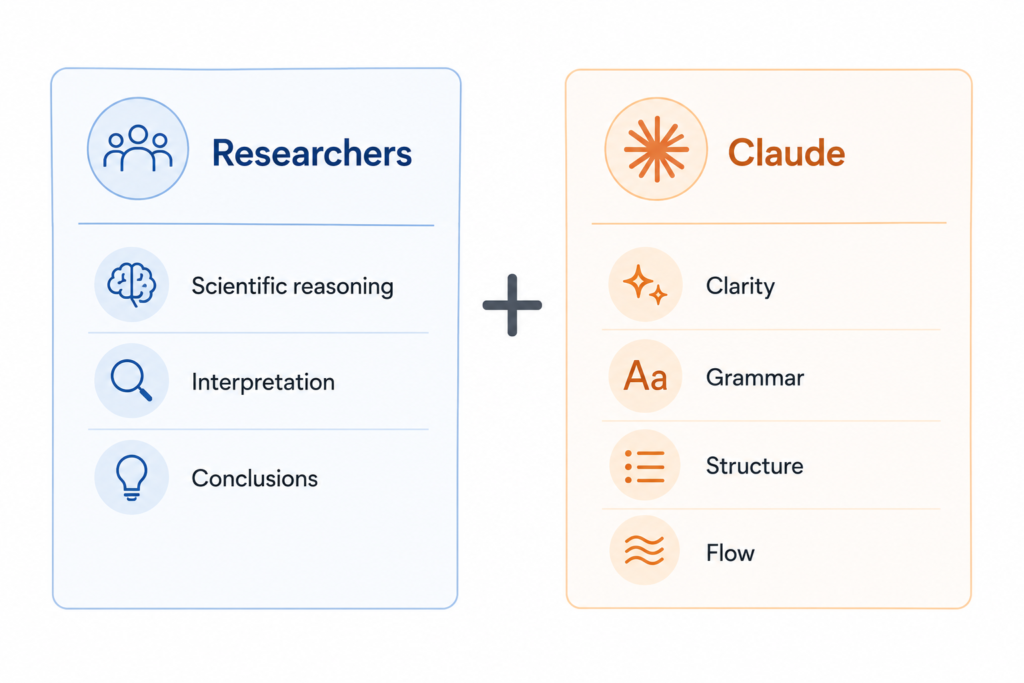
One of the most useful ways to think about Claude is to separate editing from scientific thinking.
Claude is very good at improving how ideas are communicated.
Researchers remain responsible for deciding what those ideas should be.
| Claude Should Help With | Researchers Should Do |
|---|---|
| Improve wording | Scientific interpretation |
| Improve clarity | Data analysis |
| Improve structure | Experimental design |
| Improve English | Verify scientific accuracy |
| Improve transitions | Draw scientific conclusions |
The distinction is important.
Clear writing improves communication.
It does not replace scientific judgment.
Real Writing Example
One way I use Claude regularly is during the revision stage.
By that point, I already know what I want to say. The problem is usually not the science—it’s the writing.
Here’s a simplified example.
Original draft
The results showed a significant increase in gene expression after treatment. These findings suggest that the pathway may play an important role in regulating inflammatory responses. However, additional experiments are needed to better understand the underlying mechanism.
The paragraph is scientifically accurate, but it feels a little repetitive and harder to read than it needs to be.
Instead of asking Claude to rewrite the science, I give it a very specific editing task:
Rewrite this paragraph to improve clarity and readability while preserving the scientific meaning. Do not change the interpretation or add new information.
Claude suggested the following revision:
Treatment significantly increased gene expression, suggesting that this pathway may contribute to the regulation of inflammatory responses. Further experiments will be necessary to clarify the underlying mechanism.
The scientific message didn’t change.
What changed was the writing.
The revised version is shorter, the ideas flow more naturally, and repeated wording has been reduced without altering the interpretation.
This is exactly the kind of task where I find Claude most useful.
I don’t expect it to improve the science.
I expect it to help me communicate the science more clearly.
Common Mistakes
Even well-designed prompts can produce disappointing results if Claude is used at the wrong stage of the writing process.
These are the mistakes I see most often.
❌ Mistake 1: Asking Claude to write the paper
Instead of: Write my Introduction.
Try: Improve this Introduction while preserving the scientific meaning.
Why it’s a problem
Claude can generate fluent text, but fluent writing is not the same as good science.
Your scientific reasoning should come first.
Claude should improve the writing—not replace the thinking.
❌ Mistake 2: Accepting every revision automatically
Why it’s a problem
Not every suggestion improves the manuscript.
Some revisions may change emphasis, remove important nuance, or unintentionally alter the intended meaning.
Always compare Claude’s revision with your original draft before accepting any changes.
❌ Mistake 3: Giving vague instructions
Instead of: Improve this paragraph.
Try: Improve the clarity of this paragraph while preserving the scientific meaning.
Why it’s a problem
The quality of Claude’s output depends heavily on the quality of your instructions.
Specific editing goals consistently produce more useful revisions than broad requests.
❌ Mistake 4: Using Claude before understanding the literature
Why it’s a problem
Claude works best after you’ve already read the literature and developed your own interpretation.
If your understanding of the topic is still incomplete, improving the writing won’t improve the science.
That’s why I usually organize my papers in NotebookLM before opening Claude.
My Claude Workflow
I almost never ask Claude to write scientific text from scratch. By the time I open Claude, the scientific thinking is already done. I’ve already read the literature, organized my notes, and written a rough draft in my own words.
Only then do I ask Claude to help improve the writing.
A typical workflow looks like this:
ResearchRabbit → NotebookLM → Literature Notes → First Draft → Claude → Final Editing → SubmissionEach step has a different purpose.
ResearchRabbit helps me discover relevant papers.
NotebookLM helps me understand and organize them.
The first draft is where I develop my own scientific argument. Claude comes afterward—not to replace that thinking, but to improve how clearly it is communicated.
That distinction has made Claude far more useful in my workflow.
Key Takeaways
- Write the first draft yourself before asking Claude to edit it.
- Give Claude one clear editing task at a time.
- Use Claude to improve clarity, structure, and readability—not scientific reasoning.
- Always verify scientific statements and references yourself.
- The best results come from combining your expertise with Claude’s editing ability.
Frequently Asked Questions
Can Claude write scientific papers?
Claude can generate scientific text, but it should not replace the researcher’s own interpretation or scientific reasoning. It works best as an editing assistant rather than the primary author.
Can Claude improve scientific English?
Yes. Improving grammar, sentence structure, and readability is one of Claude’s strongest use cases. Researchers should still review every revision to ensure the scientific meaning remains unchanged.
Is Claude better than ChatGPT for scientific writing?
Both tools can improve scientific writing, but their strengths may differ depending on the task and the model version.
Can Claude rewrite an Introduction or Discussion?
Yes. Claude is particularly useful for improving clarity, logical flow, and readability while preserving the original scientific message.
Can Claude replace researchers?
No. Claude can improve communication. Researchers remain responsible for scientific interpretation, experimental design, data analysis, and conclusions.
Can Claude generate citations?
Claude can help format or discuss references, but it should not be relied upon to generate or verify citations automatically. Researchers should always confirm references using the original sources and a reference manager such as Zotero.
Can Claude rewrite a paper without changing the scientific meaning?
It can help preserve meaning, but researchers should always verify that revisions have not changed the intended interpretation.
Final Thoughts
Claude is at its best when it helps researchers communicate their ideas—not create them.
The strongest scientific papers are not written by AI. They are written by researchers who know when AI should edit—and when researchers should think.
Further Reading
If you’d like to learn more about Claude, the following official resources are worth exploring:
- Anthropic Claude — Product overview and official information
- Anthropic Help Center — Documentation and support articles
- Anthropic News & Blog — Product announcements and technical updates
Related Articles
ResearchRabbit Review (2026) →
Still building your reading list? Learn how ResearchRabbit helps researchers discover influential papers before the writing process begins.
How to Use NotebookLM for Literature Reviews →
Before writing, you’ll need a clear understanding of the literature. This guide explains how to use NotebookLM to organize and analyze research papers more effectively.
Best NotebookLM Prompts for Researchers →
Looking for better ways to analyze scientific papers? Explore practical NotebookLM prompts designed for literature reviews, critical reading, and evidence synthesis.
NotebookLM Review (2026) →
Curious about NotebookLM’s strengths, limitations, and research use cases? Read our complete review before integrating it into your workflow.
Elicit Review (2026) →
After understanding the literature, Elicit can help compare evidence across multiple studies and identify broader research patterns.
Scite Review (2026) →
Before citing an important paper, learn how Scite helps researchers understand whether later studies support, challenge, or simply mention the original findings.