Last updated: July 2026
Quick Answer
Western blot smearing usually begins before antibody incubation.
In most cases, smeared bands are caused by poor sample preparation, excessive protein loading, incomplete protein denaturation, or suboptimal electrophoresis—not by the antibody itself.
The fastest way to troubleshoot a smear is to identify the smear pattern first.
Different smear patterns usually point to different stages of the experiment—and different solutions.
This guide explains how to recognize each smear pattern and troubleshoot it efficiently.
Your target band may not be missing—it may simply be difficult to interpret.
Instead of a sharp band, you might see a broad smear, a streak running down the lane, or a diffuse signal around the expected molecular weight.
It’s tempting to blame the antibody first.
In reality, smearing usually begins much earlier—during sample preparation, electrophoresis, or protein transfer.
Instead of asking,
“Why is my Western blot smeared?”
ask,
“What kind of smear am I looking at?”
Once you identify the smear pattern, the number of possible causes becomes much smaller.
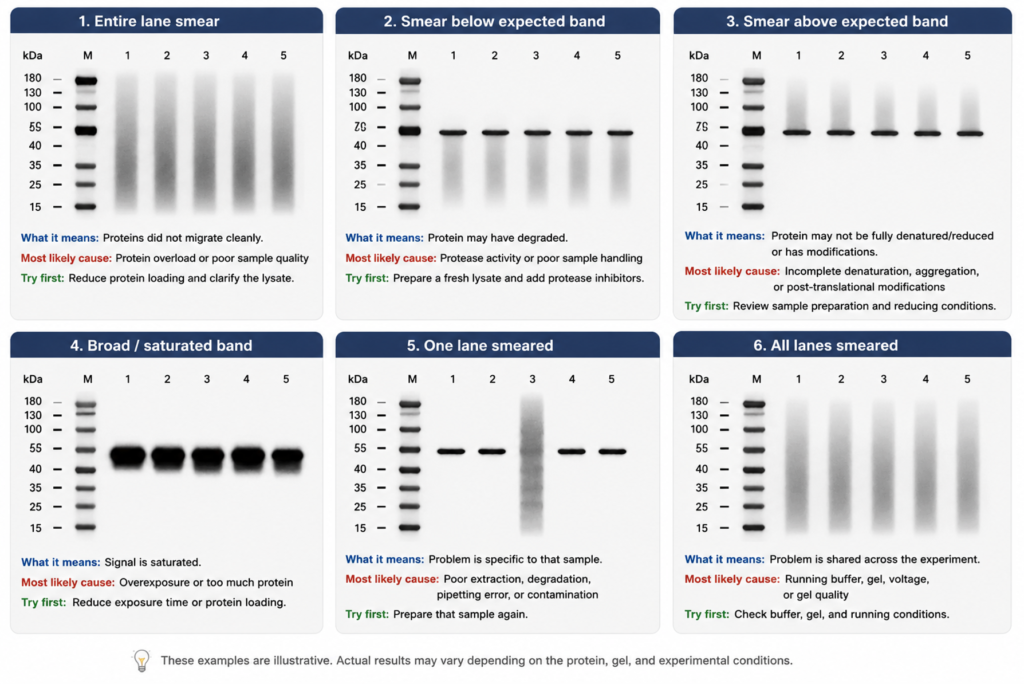
The appearance of the smear is often the fastest clue to where the problem occurred.
Different smear patterns usually originate from different stages of the workflow, so recognizing the pattern first can save a great deal of unnecessary troubleshooting.
Identify the Smear Pattern
| What you see | Most likely cause | Try this first |
|---|---|---|
| Entire lane is smeared | Protein overload or poor sample quality | Reduce protein loading |
| Smear below the expected band | Protein degradation | Prepare a fresh lysate |
| Smear above the expected band | Incomplete denaturation or protein aggregation | Review sample preparation |
| Broad, dark band | Signal saturation | Reduce exposure time |
| Only one lane is smeared | Sample-specific problem | Prepare that sample again |
| All lanes are smeared | Electrophoresis or gel problem | Check the gel and running conditions |
Think of this table as a starting point rather than a diagnosis.
Different smear patterns often point to different stages of the workflow. Identifying the pattern first helps you focus on the most likely cause before changing multiple experimental variables.
Entire Lane Is Smeared
What This Usually Means
When the entire lane appears smeared, the proteins usually did not migrate cleanly through the gel. In most cases, this points to problems with sample quality or electrophoresis, rather than the antibody.
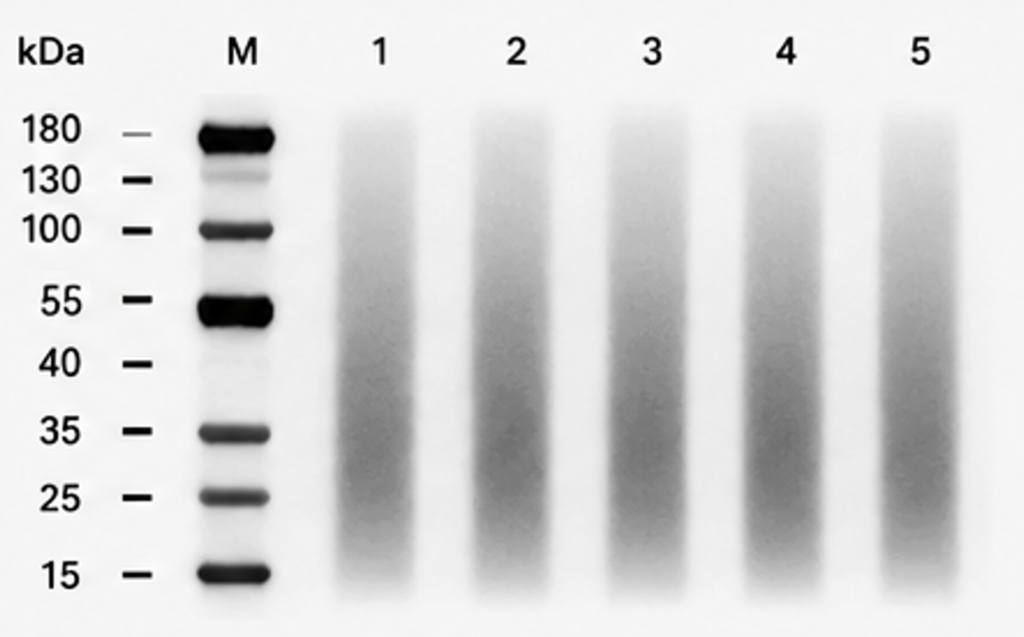
Common Causes
- Too much protein loaded
- High salt concentration
- Excess detergent
- Viscous lysates
- Insoluble debris
What to Try First
Start with the sample before changing antibody conditions.
- Reduce the amount of protein loaded.
- Clarify the lysate by centrifugation before loading.
- Avoid loading particulate material or highly viscous samples.
💡 Lab Tip
Loading more protein rarely fixes a poor-quality sample. In most cases, it only makes the smear worse.
Smear Below the Expected Band
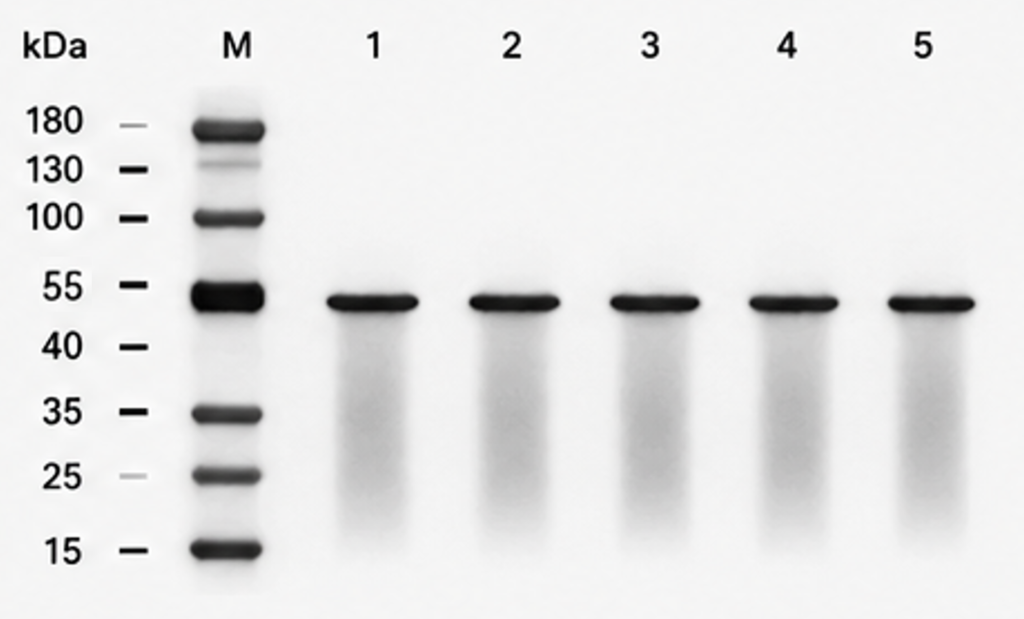
Why It Happens
A smear below the expected molecular weight often suggests that the target protein has degraded before electrophoresis.
Common Causes
- Protease activity
- Repeated freeze-thaw cycles
- Delayed sample processing
What to Try First
- Prepare fresh lysates whenever possible.
- Add protease inhibitors during sample preparation.
- Keep samples on ice and minimize processing time.
Smear Above the Expected Band
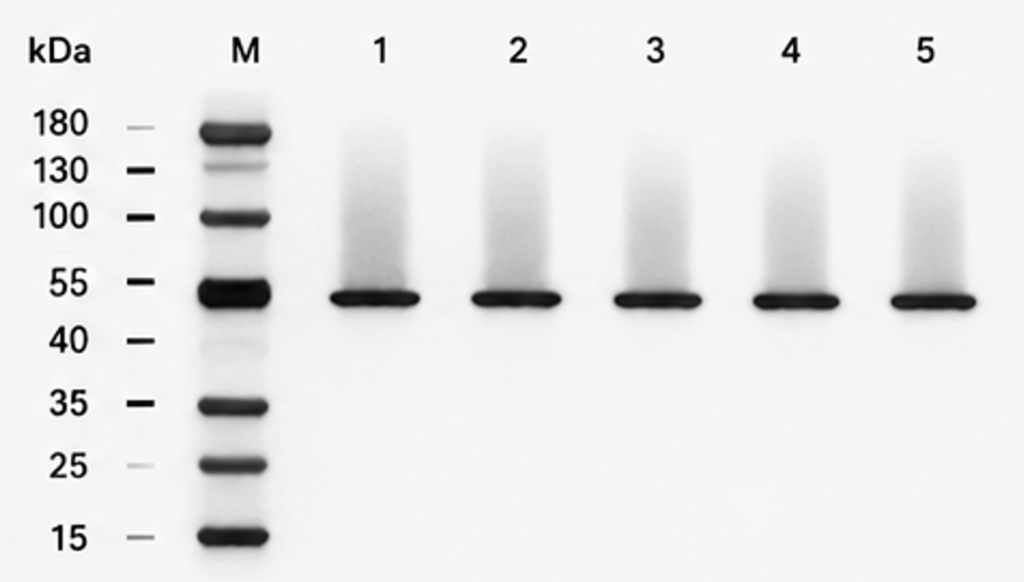
Typical Cause
A smear above the expected molecular weight often indicates that the protein did not fully denature or reduce before electrophoresis. Some proteins may also appear as broad smears because of biological heterogeneity, such as glycosylation or ubiquitination.
Common Causes
- Incomplete denaturation
- Incomplete reduction
- Protein aggregation
- Post-translational modifications
What to Try First
- Review your sample preparation protocol.
- Confirm that reducing agents were added when appropriate.
- Consider whether the target protein is known to exist in multiple modified forms.
Broad or Saturated Bands
Broad, dark bands are not always true smears. Sometimes the protein is well separated, but the detection system is simply saturated.
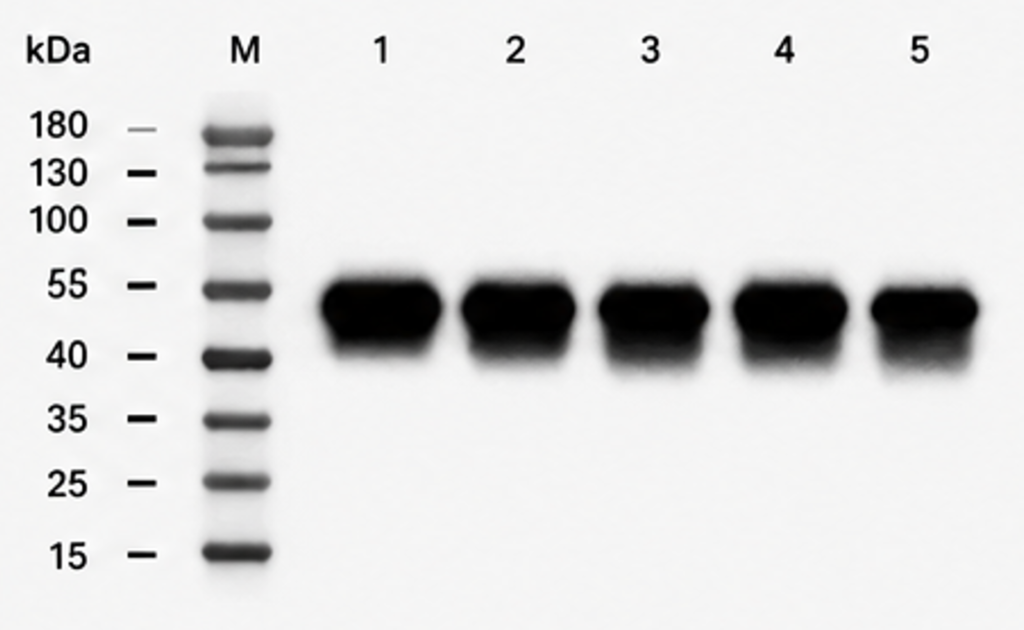
What’s Happening
The target protein is present, but the signal exceeds the useful detection range.
What to Try First
- Shorten the exposure time.
- Reduce the amount of protein loaded.
- Consider using a less sensitive ECL substrate if the target is highly abundant.
Avoid increasing the antibody concentration. This usually increases background rather than improving band quality.
Only One Lane Is Smeared
If only one lane is affected while the others appear normal, the problem is usually specific to that sample.
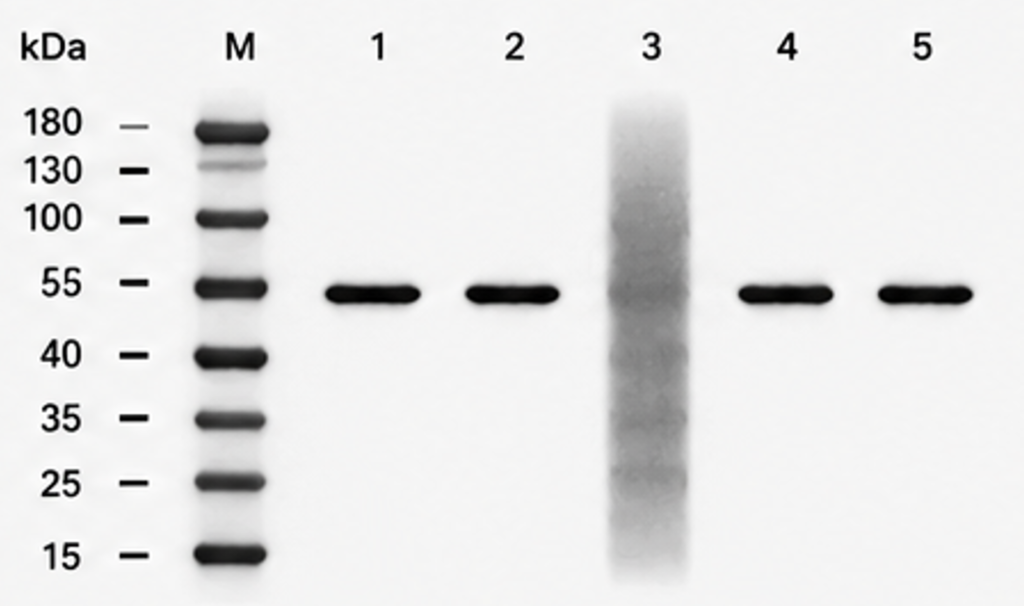
Common Causes
- Poor protein extraction
- Protein degradation
- Pipetting error
- Sample contamination
What to Try First
Prepare that sample again before changing the rest of the protocol.
A single abnormal lane rarely indicates a problem with the antibody or running conditions.
All Lanes Are Smeared
If every lane shows a similar smear, the problem is usually related to electrophoresis rather than being sample-specific.
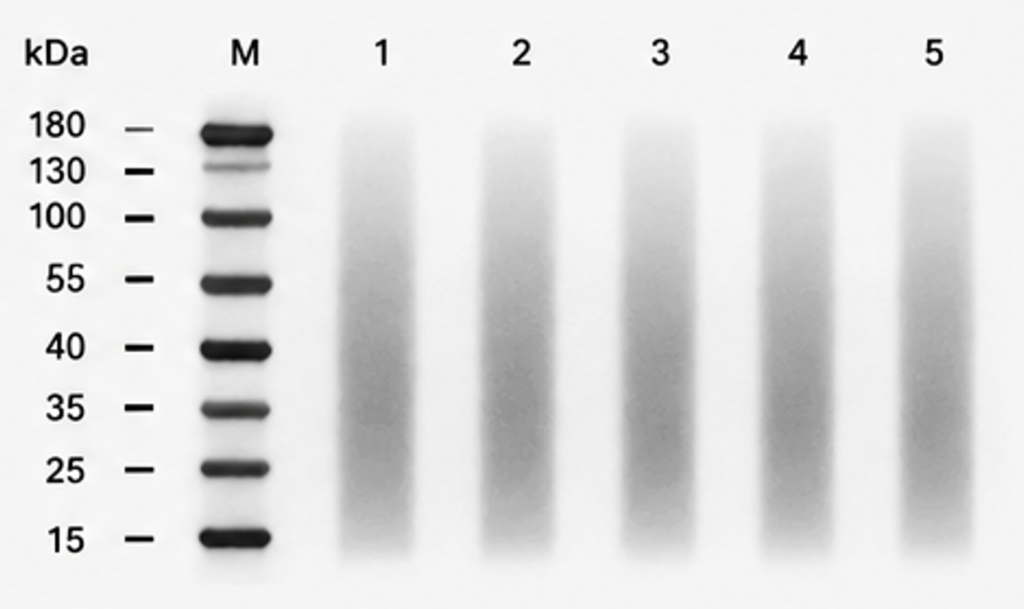
Common Causes
- Old or incorrectly prepared running buffer
- Incorrect gel percentage
- Excessive running voltage
- Poor gel quality
- Uneven gel polymerization (hand-cast gels)
- Gel-to-gel variability during casting
What to Try First
Start by repeating electrophoresis with fresh running buffer.
If you’re using hand-cast gels, prepare a new gel or test a commercial precast gel to determine whether gel preparation is contributing to the smear.
If overheating is suspected, repeat the run at a lower voltage to improve protein separation.
💡 Lab Tip
If every lane is smeared despite good sample preparation, the problem is more likely to lie in the electrophoresis step than in the samples themselves.
Fresh running buffer and a commercial precast gel can help distinguish electrophoresis or gel-related problems from sample quality issues.
Before You Repeat the Experiment
Before repeating the entire experiment, work through these quick checks first.
Many smeared blots can be improved without changing antibodies or repeating the entire workflow.
📋 Smearing Checklist
| ✓ | Check | If No |
|---|---|---|
| □ | Is the protein loading appropriate? | Load less protein. |
| □ | Was a fresh lysate prepared? | Prepare a new sample. |
| □ | Were the samples fully denatured? | Review your sample preparation protocol. |
| □ | Is the running buffer fresh? | Prepare fresh running buffer and repeat electrophoresis. |
| □ | Is the signal saturated? | Reduce the exposure time before changing other conditions. |
If every box is checked and the smear persists, the problem is more likely to involve electrophoresis, gel quality, or biological properties of the target protein than routine sample preparation.
Common Troubleshooting Mistakes
Even experienced researchers can spend hours troubleshooting the wrong variable.
The following mistakes are among the most common.
Loading More Protein to Increase Signal
More protein rarely solves a smeared blot.
Instead, overloaded samples often migrate poorly and produce broader or more diffuse bands.
Changing the Antibody First
Smearing usually begins before antibody incubation.
Always evaluate sample quality, electrophoresis, and transfer before replacing antibodies.
Ignoring Sample Quality
Fresh antibodies cannot rescue degraded or poorly prepared samples.
If only one lane is smeared, always suspect the sample before the antibody.
Increasing Exposure Before Fixing the Smear
A longer exposure increases both signal and unwanted artifacts.
If the band is already smeared, increasing exposure usually makes interpretation even more difficult.
Assuming Every Smear Is Technical
Not every smear represents a failed experiment.
Some proteins naturally appear as broad bands or smears because of post-translational modifications, including glycosylation or ubiquitination.
Before troubleshooting indefinitely, consider whether the smear may reflect the biology of the target protein rather than a technical problem.
Frequently Asked Questions
Why is my Western blot smeared?
Western blot smearing usually results from problems during sample preparation or electrophoresis. Less commonly, signal saturation or biological characteristics of the target protein may also contribute.
What causes an entire lane to smear?
Whole-lane smearing is most often caused by protein overload, poor sample quality, high salt contamination, or problems during electrophoresis.
Does loading too much protein cause smearing?
Yes. Overloading the gel is one of the most common causes of smeared or poorly resolved bands. Reducing the amount of protein loaded often improves band resolution.
Should I replace my antibody?
Usually not. Smearing typically begins before antibody incubation, so evaluate sample preparation, electrophoresis, and transfer conditions before changing antibodies.
What’s the difference between smearing and high background?
Smearing affects how proteins migrate within individual lanes, whereas high background produces unwanted signal across the membrane. The two problems have different causes and should be troubleshooted separately.
Why is only one lane smeared?
A single smeared lane usually points to a sample-specific issue, such as protein degradation, contamination, poor extraction, or a loading error, rather than a problem with the gel or antibody.
Does protein degradation cause smearing?
Yes. Protein degradation often produces a smear below the expected molecular weight because the antibody detects multiple degradation fragments.
Key Takeaways
If your Western blot is smeared, remember these principles:
- Identify the smear pattern before troubleshooting.
- Whole-lane smears usually point to sample quality or electrophoresis.
- Broad bands are not always true smears.
- Check the sample before replacing the antibody.
- Change one variable at a time during troubleshooting.
Above all, remember this:
A smear is a clue—not a diagnosis. Once you recognize the pattern, you’re already much closer to finding the real cause.
Continue Learning
Smearing is only one type of Western blot troubleshooting problem.
You may also find these guides helpful: