Last updated: July 2026
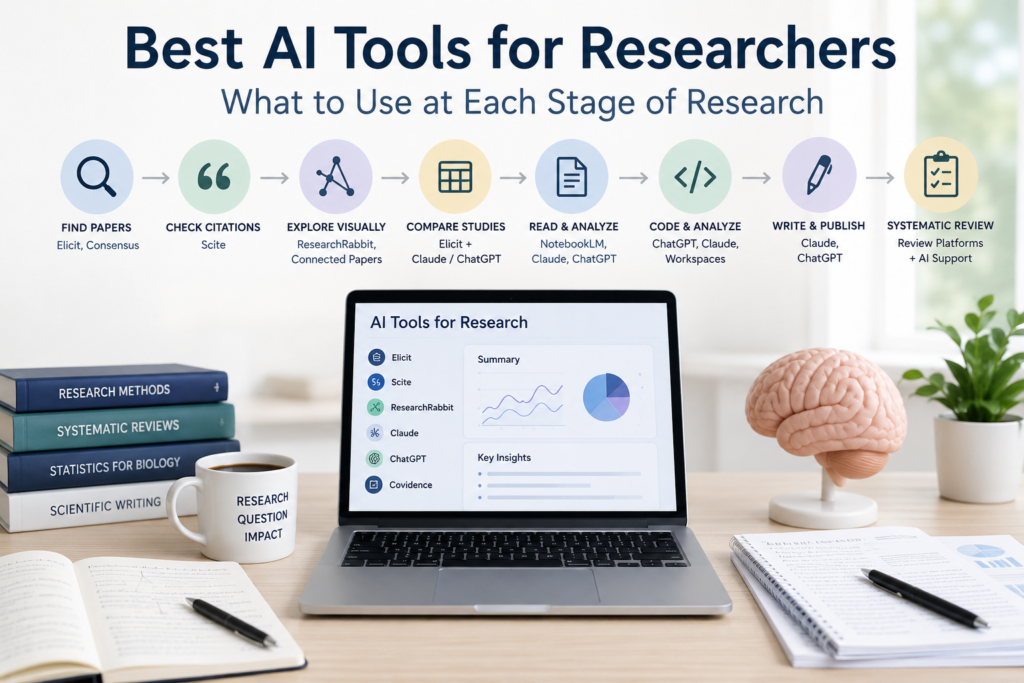
There is no single best AI tool for researchers.
The right choice depends on the problem you are trying to solve.
Finding papers, checking citation context, comparing studies, revising a manuscript, and analyzing data are different tasks. Elicit may help with literature search and extraction. Scite may help you examine how a paper has been cited. ResearchRabbit may help you expand from a few strong seed papers. Claude or ChatGPT may help you organize sources, revise writing, or work through code.
The goal is not to find one platform that does everything.
It is to give each tool a clear role in the research workflow.
Do not choose an AI tool by popularity. Choose it by the research bottleneck you need to solve.
The Short Answer
| Research need | Good starting point | Main caution |
|---|---|---|
| Find relevant papers | Elicit, Consensus, scholarly databases | No search tool guarantees complete coverage |
| Explore related literature | ResearchRabbit, Connected Papers | Citation maps are not formal searches |
| Evaluate citation context | Scite | Citation categories do not determine scientific truth |
| Compare several studies | Elicit + Claude or ChatGPT | Verify extracted fields manually |
| Read a selected paper set | NotebookLM, Claude, ChatGPT | The answer is limited by the source set |
| Conduct sourced web research | ChatGPT Deep Research or Claude Research | Current access may vary |
| Improve scientific writing | Claude or ChatGPT | Protect the scientific meaning |
| Draft or debug code | ChatGPT, Claude, executable workspaces | Check assumptions and outputs |
| Support a systematic review | Dedicated review platform + AI assistance | Keep final decisions under human control |
Most researchers do not need every tool in this table.
Start with the step that currently takes the most time, then add another tool only when it solves a different problem.
Why There Is No Single Best AI Tool
Research tools are often compared as if they all perform the same job.
They do not.
A literature-search platform is designed to retrieve papers. A citation tool helps show how those papers were discussed. A general AI assistant is better suited to flexible tasks such as writing, coding, comparison, and workflow design.
That difference matters more than a broad model ranking.
A tool may perform well on a benchmark and still fail on the details that matter in real research: a poorly labeled spreadsheet, an unusual method, missing metadata, or two studies that use similar language but measure different outcomes.
Product features also change quickly.
Finding Research Papers
Elicit
The difficult part of comparing many papers is not always reading them. It is keeping the same variables visible across the entire study set.
Elicit is helpful here because it can organize papers around repeated fields such as population, sample size, intervention, outcome, and limitation. That makes it a practical starting point for evidence mapping and early review work.
I would still treat the resulting table as a draft. Numerical values, eligibility decisions, and methodological details can change the interpretation, so the important rows need to be checked in the original papers.
Consensus
Sometimes you do not need a complete review. You need a quick sense of how a clearly defined question has been studied.
Consensus can provide that starting point and help identify papers worth reading more closely.
Its summary should not be mistaken for a formal meta-analysis, a guideline, or proof that a true scientific consensus exists.
Why scholarly databases still matter
For a formal or reproducible review, indexed databases remain essential.
Depending on the field, this may include PubMed, Google Scholar, Web of Science, Scopus, or a discipline-specific database.
Keep a record of the databases, search dates, search strings, filters, and eligibility criteria. AI can help refine search terms, but it should not quietly become the entire search strategy.
Checking Citation Context
Scite
A citation count tells you that a paper was noticed.
It does not tell you why it was cited.
Scite is useful because it brings the citation statement into view and helps separate citations that support, contrast with, or simply mention the original study.
That can be especially helpful when a result is influential or controversial. Still, the labels are only a guide to the next paper you should read. They are not a verdict on whether the original claim is correct.
Finding Related Papers Visually
Once you have a few strong seed papers, the problem changes.
You are no longer starting from nothing. You are trying to see what surrounds those papers: earlier work, later studies, recurring authors, and nearby research clusters.
ResearchRabbit is well suited to this kind of iterative exploration, especially when you want to build and expand a collection over time.
Connected Papers offers a faster snapshot around a single seed paper. It can help reveal related prior and derivative work without requiring you to trace every citation manually.
Neither graph should be treated as a complete literature search. Citation networks tend to favor well-connected papers, and visual proximity does not guarantee methodological similarity.
| Tool | Best use | Main limitation |
|---|---|---|
| ResearchRabbit | Expanding a collection over time | May miss isolated but relevant papers |
| Connected Papers | Rapid mapping around a seed paper | Graph proximity is not evidence similarity |
Comparing Many Papers
Once the paper set begins to grow, isolated summaries become difficult to use.
A fixed extraction table gives you a consistent basis for comparison. Useful fields may include population, sample size, model, intervention, endpoint, main finding, and limitation.
Elicit can help build the initial table across multiple studies. Claude is often more useful when the paper set has already been selected and the goal is to compare arguments or organize conflicting findings. ChatGPT works well when the main problem is structure—for example, turning scattered notes into a comparison matrix, review outline, or decision framework.
The comparison becomes useful only after the important details have been checked.
Pay particular attention to numerical values, subgroup definitions, endpoints, and methodological decisions that could change the conclusion.
Search scholarly databases or Elicit ↓ Build a fixed extraction table ↓ Use Claude or ChatGPT to compare patterns ↓ Check important rows manually ↓ Write the synthesis
Reading Papers You Already Have
If you are working on a small literature review, you probably do not need all of these tools.
In practice, I would rather use three tools with clearly different roles than ten platforms that overlap.
The important question is not which tool you tried first. It is whether you can explain why it belonged in the workflow.
Sometimes the problem is not finding more literature.
It is understanding the papers you already have.
| Tool | Strongest use | Main limitation |
|---|---|---|
| NotebookLM | Source-grounded reading of a selected collection | Cannot tell whether important literature is missing |
| Claude | Long-form explanation and cross-paper synthesis | Does not independently verify references |
| ChatGPT | Structured comparison, tables, and mixed-file workflows | Does not provide exhaustive scholarly retrieval |
NotebookLM is a strong choice when you want answers tied closely to a trusted source collection.
Claude is useful when several papers need to be compared in detail or explained in prose.
ChatGPT may be a better fit when the material needs to become a table, workflow, report, or combined text-and-code analysis.
The main limitation is shared by all three: a source-grounded answer can still be incomplete when the uploaded collection is incomplete.
Choosing Between Claude and ChatGPT
Claude and ChatGPT overlap in many areas, so choosing between them rarely requires a permanent commitment.
Start with the tool that best matches the immediate bottleneck.
| Main bottleneck | Better starting point |
|---|---|
| Disorganized notes | ChatGPT |
| Dense paper collection | Claude |
| Source-based web report | Research-enabled ChatGPT or Claude |
| Manuscript clarity | Claude or ChatGPT |
| Coding and analysis | A tool with execution access |
| Evidence validity | The original paper |
Using AI in a Systematic Review
AI can assist with selected parts of a systematic review.
It may help with:
- developing search concepts
- piloting screening criteria
- classifying abstracts
- creating extraction templates
- checking consistency
- organizing study characteristics
- generating analysis code
Formal reviews, however, require more than efficient summarization.
They may require:
- reproducible searches
- deduplication
- duplicate screening
- documented exclusions
- protocol adherence
- risk-of-bias assessment
- evidence grading
- PRISMA-compliant reporting
- a transparent audit trail
Dedicated platforms may include:
- Covidence
- Rayyan
- EPPI-Reviewer
- DistillerSR
AI can reduce parts of the workload, but the review still needs a clear record of how each decision was made.
Final inclusion decisions, exclusion reasons, bias judgments, and evidence grading should remain under human oversight.
Using AI for Scientific Writing
Scientific writing is not simply a matter of producing fluent sentences.
The wording must match the strength of the evidence.
Claude is often useful when a long section needs clearer flow, less repetition, or more natural prose. ChatGPT may be a better starting point when the structure itself is unclear—for example, when scattered notes need to become an outline, table, reviewer response, or draft framework.
The distinction is not absolute. Both tools can perform many of the same tasks.
What matters is what you ask them not to change.
A writing assistant should not add unverified references, strengthen causal language, remove limitations, or produce conclusions that go beyond the data.
Reference managers such as Zotero, EndNote, and Mendeley still have a separate role: organizing and inserting verified citations.
| Writing task | AI role | Researcher responsibility |
|---|---|---|
| Improve clarity | Revise wording | Check scientific meaning |
| Reorganize paragraphs | Suggest structure | Preserve the argument |
| Draft tables | Format content | Verify every entry |
| Add references | High risk | Confirm manually |
| Strengthen claims | Avoid | Match claims to evidence |
A smoother sentence is not automatically a better scientific sentence.
Using AI for Coding and Data Analysis
Claude and ChatGPT can help draft code, explain errors, and suggest analytical steps.
But the important question is not: Can the AI write code?
It is: Can I reproduce and verify what the code did?
A useful research environment should make it possible to inspect the input files, run the code, identify errors, explain assumptions, and reproduce the final outputs.
General assistants such as ChatGPT, Claude, and Claude Code may help with drafting and debugging. Scientific workspaces may add execution, data handling, or figure generation.
The generated code still needs to be tested against the actual data.
Check the preprocessing steps, missing-value handling, statistical assumptions, package versions, output files, and whether the figures can be regenerated from the saved code.
A Practical AI Research Workflow
The strongest research workflow is not the one with the most tools.
It is the one where each tool has a clear job.
Define the research question
        ↓
Search scholarly databases or Elicit
        ↓
Expand from seed papers with ResearchRabbit or Connected Papers
        ↓
Inspect citation context with Scite
        ↓
Read selected sources in NotebookLM, Claude, or ChatGPT
        ↓
Extract evidence into a fixed table
        ↓
Compare studies with Claude or ChatGPT
        ↓
Verify claims in the original papers
        ↓
Write and revise the synthesis
        ↓
Record tools, prompts, and corrections
In practice, you may not need every step.
A small project may need only PubMed, Zotero, and one general AI assistant.
A broader evidence review may require Elicit, Scite, a reference manager, and a dedicated review platform.
The goal is not to collect subscriptions.
The goal is to reduce friction without losing traceability.
A real example
Imagine that you are reviewing whether Protein X increases inflammatory cytokine production. Two relevant papers appear to reach different conclusions.
At first glance, the two papers seem to tell completely different stories.
One reports a clear increase in inflammatory cytokine production. The other finds no significant effect.
Once you look at the methods, though, the contradiction starts to look much smaller.
One study measured cytokine mRNA after two hours in an immortalized cell line. The other measured secreted protein after twenty-four hours in primary macrophages.
Those experiments do not ask exactly the same question.
AI helped make the difference easier to see.
It did not decide what that difference meant.
That still required biological judgment.
Which Tools Fit Different Types of Researchers?
| Researcher type | Practical starting tools |
|---|---|
| Undergraduate student | Google Scholar or PubMed + NotebookLM + Zotero |
| Graduate student | Elicit + Scite + Claude or ChatGPT + Zotero |
| Wet-lab researcher | PubMed + Scite + Claude or ChatGPT |
| Computational researcher | Scholarly databases + executable AI assistant + version control |
| Systematic reviewer | Dedicated review platform + AI-assisted screening or extraction |
| PI or lab manager | Scite + general research assistant + shared reference manager |
| Interdisciplinary researcher | Elicit or Consensus + ResearchRabbit + general AI assistant |
These are starting points, not mandatory stacks.
Most researchers do not need every tool.
Start with one clear bottleneck.
Add another platform only when it solves a different problem.
Common Mistakes
Choosing tools by popularity
The most popular platform may not solve your current problem.
Choose by task.
Using one tool for everything
Search, citation evaluation, synthesis, writing, and analysis may require different tools.
Do not force one chatbot into every role.
Trusting cited answers automatically
A citation can be real and still fail to support the claim.
Check the source and the claim–source relationship.
Confusing summaries with evidence synthesis
A summary explains what one paper says.
A synthesis explains how several studies relate, differ, and contribute to the overall evidence.
Using too many overlapping tools
Too many platforms can scatter notes, duplicate work, and make the process difficult to audit.
A smaller workflow is often better.
Ignoring privacy and institutional policy
Do not upload unpublished manuscripts, patient information, confidential peer review, proprietary datasets, or sensitive institutional documents without checking the relevant policies.
Limitations and Risks
| Limitation | Why it matters |
|---|---|
| Hallucinated references | False citations may enter academic work |
| Incomplete retrieval | Relevant studies may be missed |
| Weak numerical extraction | Values may be misread or misplaced |
| Loss of methodological nuance | Controls and assumptions may disappear |
| Overconfident synthesis | Mixed evidence may sound settled |
| Automation bias | Polished outputs may be overtrusted |
| Privacy risks | Sensitive material may be exposed |
| Poor reproducibility | Tool use and corrections may not be documented |
Keep an AI-use log
For serious academic work, record:
- tool and model used
- access date
- prompts
- uploaded files
- search queries
- inclusion criteria
- corrections
- final human decisions
That record may become important when revising a paper, reproducing a workflow, or explaining how AI was used.
Frequently Asked Questions
What is the best AI tool for researchers?
There is no single best tool. The right choice depends on whether you need paper discovery, citation context, synthesis, writing, coding, or formal review support.
Which AI tool is best for literature review?
Elicit is useful for search and structured extraction. Scite helps with citation context. Claude and ChatGPT help organize and synthesize selected papers. A strong workflow often combines more than one of these.
Is Elicit better than Scite?
They serve different purposes. Elicit is stronger for literature search and evidence extraction. Scite is stronger for understanding how papers have been cited.
What is the best AI tool for reading research papers?
NotebookLM, Claude, and ChatGPT can all be useful. NotebookLM is particularly useful for a selected source collection. Claude is useful for long-form synthesis. ChatGPT is useful for structured comparison and mixed workflows.
Is Claude better than ChatGPT for research?
Not universally. Claude may be a better starting point for long-form synthesis and writing. ChatGPT may be a better starting point for structured workflows, coding, and tool-supported research.
Which AI tool is best for systematic reviews?
Dedicated review platforms remain important. AI tools may assist with screening, extraction, and organization, but final decisions and audit trails should remain under human control.
Is it safe to upload unpublished research?
Do not assume that it is. Check institutional policy, contracts, consent requirements, privacy settings, and the provider’s current data-handling terms.
Should researchers disclose AI use?
Requirements vary by journal, institution, funder, and type of use.
Key Takeaways
No single AI tool is best for every research task.
Use search tools to find papers, citation tools to evaluate context, and general assistants to organize, compare, write, or code.
Keep formal review decisions and evidence appraisal under human control.
Verify references, numbers, methods, and interpretations in the original sources.
A smaller toolset with clearly defined roles is usually better than a large collection of overlapping platforms.
Most importantly:
Do not choose an AI tool by popularity. Choose it by the research bottleneck you need to solve.
Continue Learning
AI for Literature Review
- AI Literature Review Workflow
- How to Use Claude for Literature Review
- How to Use Scite for Literature Review
- How to Read Research Papers with AI
Tool Reviews
- Elicit Review
- NotebookLM Review
- ResearchRabbit Review
- Claude Science Explained
- Claude vs ChatGPT for Research