A step-by-step workflow for finding, evaluating, reading, organizing, and writing from scientific literature—with real life-science examples.
Last updated: August 2026 • 14 min read
Quick Answer
AI works best when each tool has a clearly defined role.
Instead of relying on a single AI assistant to do everything, I prefer to build a workflow where each tool solves a different research problem—from understanding an unfamiliar topic and finding papers to evaluating citation context, comparing evidence, organizing notes, and improving scientific writing.
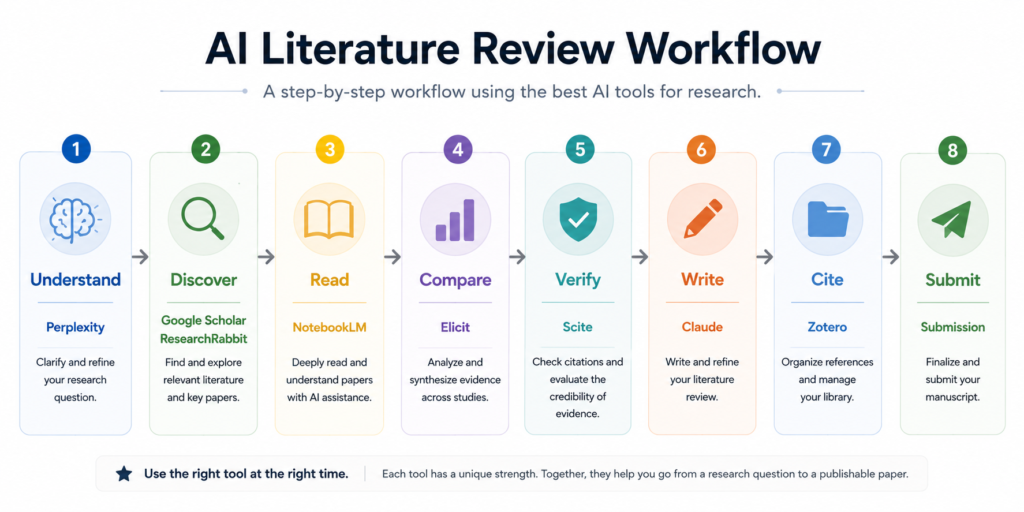
A practical workflow might look like this:
Research Question → Perplexity → Google Scholar / PubMed → ResearchRabbit → NotebookLM → Elicit → Scite → Zotero → Claude
The exact order can change depending on the project.
The important point is that no single AI tool should be responsible for the entire literature review.
The goal is not to automate scientific thinking.
The goal is to spend less time on repetitive tasks and more time evaluating the evidence.
Why Literature Reviews Feel Overwhelming
Every literature review begins with the same problem.
There are simply too many papers—and never enough time.
Finding relevant studies is only the beginning.
The real work starts afterward:
- deciding which papers deserve closer attention,
- understanding how they relate to one another,
- identifying conflicting findings,
- evaluating methods and limitations,
- organizing notes,
- and eventually turning the literature into a coherent scientific argument.
That is where researchers often spend most of their time.
AI tools can make parts of this process faster.
But they become much more useful when they are treated as specialized tools within a workflow, rather than as one system expected to perform the entire review.
That is what this guide focuses on.
Rather than asking:
“What is the best AI tool for literature reviews?”
I think the more useful question is:
“Which tool is most useful at each stage of the literature review?”
Before You Build an AI Workflow
Before using any AI tool for research, I keep one principle in mind:
AI can make research faster. It cannot make scientific decisions for me.
An AI system can summarize a paper.
It can help locate information.
It can organize notes.
It can suggest related literature.
But it cannot decide for me whether:
- an experiment is convincing,
- the controls are appropriate,
- a sample size is sufficient,
- a biological effect is meaningful,
- or a conclusion is justified by the data.
Those decisions still require reading the original literature.
Throughout this workflow, I treat AI tools as specialized research assistants, not as replacements for scientific judgment.
AI should support scientific thinking—not replace it.
The Complete AI Literature Review Workflow
For many research projects, my workflow looks something like this:
Research Question
      ↓
Perplexity
      ↓
Google Scholar / PubMed
      ↓
ResearchRabbit
      ↓
NotebookLM
      ↓
Elicit
      ↓
Scite
      ↓
Zotero
      ↓
Claude
      ↓
Manuscript
Each tool answers a different question.
- Perplexity: What do I need to understand before I begin?
- Google Scholar / PubMed: Which papers should I start with?
- ResearchRabbit: What related literature am I missing?
- NotebookLM: What do these papers actually say?
- Elicit: What patterns or differences appear across studies?
- Scite: How have important papers been cited by later research?
- Zotero: How should I organize and manage the literature?
- Claude: How can I improve the clarity of what I have already written?
No single tool performs every step well.
The advantage comes from using each tool for the task it handles best.
Part 1 — Understand and Discover the Literature
Step 1: Understand the Topic With Perplexity
When I enter an unfamiliar research area, I usually do not begin by downloading papers immediately.
First, I try to build enough background knowledge to understand what I am searching for.
I may ask:
- What are the major concepts in this field?
- Which terminology should I know?
- What proteins, pathways, or experimental systems appear repeatedly?
- Are there several competing models?
- What keywords will be useful when I move to PubMed?
This is where a tool such as Perplexity can be useful.
The goal is not to obtain scientific evidence from Perplexity.
The goal is to build a map of the terminology.
A typical early-stage workflow looks like:
Research Question
      ↓
Terminology
      ↓
Key Concepts
      ↓
Search Terms
      ↓
Primary Literature
When I Stop Using Perplexity
Once I understand the basic vocabulary of the topic, I move to the scientific literature.
At that point:
background exploration ends and evidence evaluation begins.
I do not rely on an AI-generated explanation when the original study is available.
Step 2: Find the First Important Papers With PubMed or Google Scholar
Once I know what I am looking for, I move to traditional academic databases.
For biomedical research, I usually want PubMed somewhere near the beginning of the process.
Google Scholar is also useful for broader searching and citation discovery.
At this stage, I am not trying to collect hundreds of papers.
I am trying to identify a few strong starting points:
- recent review papers,
- landmark studies,
- highly relevant primary research,
- or papers repeatedly cited by other researchers.
The first goal is simple:
Find one or two papers that are good enough to become starting points for deeper exploration.
That leads naturally to ResearchRabbit.
Step 3: Expand the Literature With ResearchRabbit
Keyword searching works well when I already know how to describe what I am looking for.
But important papers do not always use the terminology I expect.
That is where ResearchRabbit becomes useful.
Instead of continuing to change keywords, I can give ResearchRabbit a paper I already trust and ask a different question:
“What literature is connected to this paper?”
A simple workflow looks like:
PubMed / Google Scholar
      ↓
Seed Paper
      ↓
ResearchRabbit
      ↓
Related Papers
      ↓
Citation Network
This is one of the stages I tested directly.
In my ResearchRabbit Review, I started with a 2025 Nature paper on host-cell Z-RNAs and ZBP1 during viral infection.
Rather than simply searching for more papers containing “Z-RNA” or “ZBP1,” I followed the citation network outward.
ResearchRabbit eventually led me to a 2024 structural biochemistry paper by Nichols and colleagues examining the Zα domain of ADAR1 and its ability to bind an A-form-like nucleic acid duplex.
That paper was interesting precisely because it was not an obvious extension of my original search.
My seed paper focused on:
host Z-RNA → ZBP1 → innate immune responses
The unexpected paper raised a different question:
What does binding by a Zα domain actually tell us about nucleic-acid conformation?
That is the kind of discovery I find difficult to reproduce with narrow keyword searches alone.
If you want to see that experiment in more detail, I documented it in my ResearchRabbit Review (2026).
When NOT to Use ResearchRabbit
ResearchRabbit is much more useful after I already have a meaningful seed paper.
If I have not yet identified a good starting point, I generally prefer PubMed or Google Scholar first.
Part 2 — Read and Evaluate the Evidence
Step 4: Read a Focused Set of Papers With NotebookLM
Once I have collected a smaller group of relevant papers, the problem changes.
I am no longer asking:
“What should I find?”
I am asking:
“What do these papers actually say?”
That is where NotebookLM can become useful.
I can upload a focused set of papers and use it to:
- locate specific findings,
- compare statements across documents,
- organize notes,
- identify recurring themes,
- and ask questions grounded in the uploaded material.
One question I often find useful is:
“Which findings appear consistently across these papers?”
That begins shifting the task from reading papers in isolation to thinking about the literature as a body of evidence.
But I still open important figures and methods myself.
An AI summary cannot tell me whether the controls are convincing.
For my own approach to evaluating experimental papers, see How I Read a Biology Paper: From Abstract to Figures.
For a more detailed NotebookLM workflow, see How to Use NotebookLM for Literature Reviews.
When NOT to Use NotebookLM
NotebookLM is not my first choice for discovering literature.
It becomes much more useful after I already have the papers.
Step 5: Compare Evidence Across Papers With Elicit
After reading the most important studies individually, I want to understand how they compare.
That means asking questions like:
- Do several studies report the same effect?
- Are they using the same model?
- Do experimental conditions differ?
- Are there contradictory findings?
- Which conclusions are based on small datasets?
- Where are the research gaps?
This is where Elicit can help.
Rather than focusing on a single paper, I use evidence-comparison tools to organize studies side by side.
The conceptual workflow becomes:
Individual Papers
      ↓
Evidence Table
      ↓
Patterns
      ↓
Differences
      ↓
Research Gaps
This stage is particularly useful because two papers that appear to disagree may actually be studying different conditions.
For example, differences may come from:
- cell type,
- dose,
- time point,
- animal model,
- assay,
- endpoint,
- or definition of the phenotype.
AI can help organize those differences.
But interpreting why they matter remains the researcher’s responsibility.
For more detail, see my Elicit Review (2026).
Step 6: Check Citation Context With Scite
A highly cited paper can feel authoritative.
But citation count alone does not tell me whether later studies:
- supported the finding,
- challenged part of it,
- or simply cited the paper as background.
That is why I use Scite as a citation-context checkpoint.
Instead of asking:
“How many times was this paper cited?”
Scite helps me investigate:
“How was this paper cited?”
I tested this idea separately using the classic ferroptosis paper by Dixon et al.
Scite showed a large citation record, but most citation statements were classified as Mentioning, with much smaller numbers classified as Supporting or Contrasting.
I then opened one of the Contrasting citations.
The later paper did not reject ferroptosis as a whole.
Instead, it reported a different relationship between NOX expression and erastin sensitivity.
That example changed how I interpret Scite’s labels.
A Contrasting citation does not necessarily mean:
“This paper was wrong.”
It may mean:
“One specific mechanism or interpretation was different under another experimental condition.”
That is why I do not treat Smart Citation labels as scientific verdicts.
I use them to identify citations worth reading.
A practical workflow is:
Citation Count
      ↓
Scite Category
      ↓
Citation Statement
      ↓
Original Citing Paper
      ↓
Scientific Judgment
I describe this experiment in more detail in my Scite Review (2026).
When Citation Counts Become Misleading
A large number of citations demonstrates influence.
It does not automatically demonstrate independent experimental confirmation.
Citation frequency and strength of evidence are related—but they are not the same thing.
Part 3 — Organize What Is Worth Keeping
Step 7: Organize the Final Literature With Zotero
AI tools can help me discover, compare, and understand papers.
But I still want a stable place to manage the literature I decide is worth keeping.
That is where Zotero fits.
I do not put every paper I encounter into my permanent library.
By this stage, I have usually already decided which papers are:
- central to the research question,
- useful background,
- methodologically important,
- contradictory,
- or worth revisiting later.
I then organize the useful papers into collections and add whatever notes or tags will help me find them again.
For example:
Z-RNA Project
├── Reviews
├── ZBP1
├── ADAR1
├── Viral Infection
├── Structural Studies
└── Methods
The exact organization does not matter as much as having a system I can maintain.
For me, Zotero is not where I understand the literature.
It is where I make sure the literature I have already evaluated does not disappear into a folder full of PDFs.
Part 4 — Write Only After the Scientific Thinking Is Done
Step 8: Use Claude as an Editor, Not as the Scientist
Only after I have:
- identified the important literature,
- read the key papers,
- compared the evidence,
- checked contradictory findings,
- and organized my notes,
do I want an AI writing tool involved.
At that stage, I may use Claude.
But I prefer giving it text I have already written.
Instead of:
“Write my Discussion.”
I would rather ask:
“Rewrite this Discussion to improve clarity while preserving the scientific meaning.”
That changes the role of the AI.
It becomes an editor, not the author of the scientific reasoning.
The workflow looks like this:
Evidence
      ↓
My Interpretation
      ↓
My Draft
      ↓
Claude
      ↓
Editing
      ↓
Final Verification
AI can improve:
- clarity,
- transitions,
- structure,
- conciseness,
- and readability.
But it should not invent scientific conclusions that I have not reached myself.
For a more detailed workflow, see How to Use Claude for Scientific Writing (2026).
My Real Test: Starting From One Life-Science Question
The workflow above can look very neat when written as a diagram.
Real research is usually messier.
To see how part of this process works in practice, I tested it with literature around Z-RNA biology and innate immune recognition.
My starting question was broadly:
How are Z-form nucleic acids recognized during innate immune responses?
I did not try to answer the entire question with one AI tool.
Instead, I moved through the literature in stages.
Stage 1: Identify a Strong Starting Paper
I started from a 2025 Nature paper examining how host-cell Z-RNAs activate ZBP1 during viral infection.
This gave me a focused biological starting point:
Viral Infection
      ↓
Host-Derived Z-RNA
      ↓
ZBP1
      ↓
Innate Immune / Cell-Death Signaling
At this stage, traditional literature search had done its job.
I had a paper worth exploring.
Stage 2: Expand Beyond the Obvious Keywords
I added the paper to ResearchRabbit.
This changed the question from:
“What else contains the words Z-RNA and ZBP1?”
to:
“What literature is connected to this paper?”
One of the papers I encountered was:
Nichols et al. (2024), Zα Domain of ADAR1 Binds to an A-Form-like Nucleic Acid Duplex with Low Micromolar Affinity.
This was not the paper I would have expected to prioritize from a narrow infection-focused search.
But it raised an important mechanistic question.
If an ADAR1 Zα domain can bind a nucleic acid construct that is prevented from adopting the canonical Z-conformation, then:
How specific is Zα-domain binding as evidence that a nucleic acid is actually in the Z-form?
That question broadened my original literature map.
And that is exactly what I want from a literature-discovery tool.
Stage 3: Decide What Deserves Deeper Reading
At this point, the next step is not to download every recommendation.
I would narrow the literature into groups such as:
- biological studies of ZBP1,
- ADAR1 and Zα-domain studies,
- structural studies of Z-nucleic acids,
- viral infection models,
- mechanistic papers on downstream signaling.
This is where tools such as NotebookLM and Elicit become useful.
NotebookLM can help me navigate a focused set of papers.
Elicit can help compare them systematically.
But neither replaces the need to open the important figures and determine whether the experiments actually support the conclusions.
Stage 4: Check How Important Claims Evolved
For influential older papers, this is where I would use Scite.
The Z-RNA seed paper itself is relatively recent, so its citation landscape may not yet be mature enough to make Scite the most informative stage of this particular example.
That is an important limitation.
Not every tool is equally useful for every paper.
This is why I tested Scite separately using the highly cited Dixon ferroptosis paper, where enough later literature exists to make citation context meaningful.
In that case, Scite helped identify a specific mechanistic disagreement that would have been invisible in the raw citation count alone.
Stage 5: Build a Library I Can Actually Use Later
Once I decide which Z-RNA papers are worth keeping, I would move the final set into Zotero.
At that point, I want the collection to reflect how I think about the field rather than simply when I downloaded each PDF.
For example:
Z-RNA Literature
├── ZBP1
├── ADAR1
├── Zα Domains
├── Viral Infection
├── Structural Biology
└── Reviews
The literature review does not end when I find the papers.
It becomes useful when I can retrieve the right paper again months later.
What This Example Changed About My Workflow
The biggest lesson was not that every research project needs eight different tools.
It was almost the opposite.
The useful tool changes with the question I am asking.
When I need a starting paper: PubMed or Google Scholar
When I want to expand from that paper: ResearchRabbit
When I want to navigate several PDFs: NotebookLM
When I want to compare evidence: Elicit
When I want to inspect how an influential claim has been treated later: Scite
When I want to keep the literature organized: Zotero
When I already understand the science and want to improve the writing: Claude
Each tool can be useful on its own.
The real advantage comes from using each one for the stage of research it handles best.
Common Mistakes
Using One AI Tool for the Entire Literature Review
Every AI tool has strengths and weaknesses.
The mistake is expecting one system to:
- find literature,
- evaluate it,
- summarize it,
- compare it,
- write about it,
- and manage the references.
A specialized workflow is usually more reliable.
Skipping the Original Papers
Why It’s a Problem
AI summaries are useful for orientation.
They are not substitutes for:
- figures,
- methods,
- supplementary data,
- controls,
- or experimental details.
Those are often exactly where the important scientific information is found.
Better Approach
Use AI to prioritize reading.
Read the original paper before citing it or relying on an important scientific claim.
Trusting AI Summaries Without Verification
Why It’s a Problem
Even when an AI system provides citations, summaries can:
- simplify a finding,
- omit limitations,
- confuse correlation with causation,
- or remove important experimental context.
Better Approach
Whenever a claim affects your own research or writing, return to the original source.
Treating Citation Count as Evidence Quality
A paper can be cited thousands of times and still have specific claims challenged or revised.
Citation count measures scientific attention.
It does not directly measure scientific agreement.
Use citation context when an influential claim matters to your argument.
Writing Before Understanding the Evidence
Why It’s a Problem
Writing becomes much harder when the literature is still disorganized.
It often leads to repeated rewriting because your interpretation is still changing.
Better Approach
Understand first.
Organize second.
Write third.
AI writing assistance should come after those stages—not before them.
Which AI Tool Should You Use?
| Research Goal | Tool I Would Consider |
|---|---|
| Understand unfamiliar terminology | Perplexity |
| Find initial scientific papers | PubMed / Google Scholar |
| Discover connected literature | ResearchRabbit |
| Read and navigate collected papers | NotebookLM |
| Compare evidence across studies | Elicit |
| Check citation context | Scite |
| Manage references and collections | Zotero |
| Improve scientific writing | Claude |
The point is not that these are the only tools available.
The point is to match the tool to the task.
Key Takeaways
- No single AI tool performs every stage of a literature review well.
- Start with scientific databases and primary literature.
- Use ResearchRabbit after identifying a strong seed paper.
- Use NotebookLM after collecting a focused set of documents.
- Use Elicit to help compare studies rather than relying only on individual summaries.
- Use Scite to investigate citation context—not as a score of scientific truth.
- Keep the literature you actually need in a reference manager such as Zotero.
- Use AI writing tools after the scientific reasoning has already been done.
- Always return to the original paper when an important claim matters.
Above all: A good AI literature workflow should reduce repetitive work without reducing scientific judgment.
Frequently Asked Questions
What is the best AI workflow for literature reviews?
There is no universal workflow.
For many research projects, a practical sequence is:
Perplexity → PubMed / Google Scholar → ResearchRabbit → NotebookLM → Elicit → Scite → Zotero → Claude
But the order should change depending on the research question.
Should I use AI before searching PubMed?
AI can be useful for learning unfamiliar terminology before beginning a search. But once the scientific question becomes clear, I prefer moving to PubMed, Google Scholar, and primary literature.
Can AI replace Google Scholar or PubMed?
No.
AI tools can complement literature databases, but they should not replace them. For biomedical research in particular, PubMed remains an important starting point for locating scientific literature.
Which AI tool is best for finding related papers?
ResearchRabbit is particularly useful once you already have one or more relevant papers and want to expand the literature through citation relationships.
Which AI tool is best for reading papers?
NotebookLM can be useful when working with a focused collection of uploaded papers. But important experimental claims should still be checked against the original figures, methods, and results.
Which AI tool is best for comparing papers?
Elicit can help structure information across multiple studies and identify differences in findings or study design. Researchers still need to interpret what those differences mean.
Is Scite useful for literature reviews?
Yes, especially for influential papers with a substantial citation history. Its main value is helping researchers inspect citation context rather than relying only on citation counts.
Should I use NotebookLM before Claude?
Usually, yes.
Understanding the literature should come before writing about it. I prefer using NotebookLM during reading and organization, then using Claude only after I have formed my own interpretation and written a draft.
Can AI write my literature review for me?
It can generate text.
That is not the same as conducting a literature review.
A meaningful review still requires the researcher to:
- select relevant literature,
- evaluate methods,
- compare evidence,
- identify limitations,
- interpret contradictions,
- and decide what conclusions are justified.
AI can assist those tasks.
It should not silently replace them.
Final Thoughts
The best literature review workflow is not built around one AI tool.
It is built around a sequence of research questions.
What do I need to understand?
Which papers should I read?
What literature am I missing?
What do these papers actually show?
Where do the studies agree or disagree?
How have important claims changed over time?
Which papers are worth keeping?
How can I communicate my interpretation clearly?
Different tools can help at different stages.
But the most important parts of the process still belong to the researcher:
reading, questioning, evaluating, and deciding what the evidence actually supports.
That is the workflow I want AI to make easier.
Not replace.
Further Reading
If you want to explore individual stages of this workflow in more detail:
- ResearchRabbit Review (2026) — How I used one Z-RNA seed paper to explore connected literature.
- Scite Review (2026) — How citation context changes the way I interpret highly cited research.
- NotebookLM Review (2026) — Where NotebookLM fits into scientific reading.
- How to Use NotebookLM for Literature Reviews — A practical workflow for working with multiple papers.
- Elicit Review (2026) — Using structured evidence comparison during literature review.
- How to Use Claude for Scientific Writing (2026) — Using Claude after the scientific reasoning is complete.
- How I Read a Biology Paper: From Abstract to Figures — How I evaluate figures, controls, methods, statistics, and limitations.
- How to Organize Research Papers Efficiently (2026) — Practical approaches to maintaining a usable research library.