Last updated: July 2026 • 12 min read
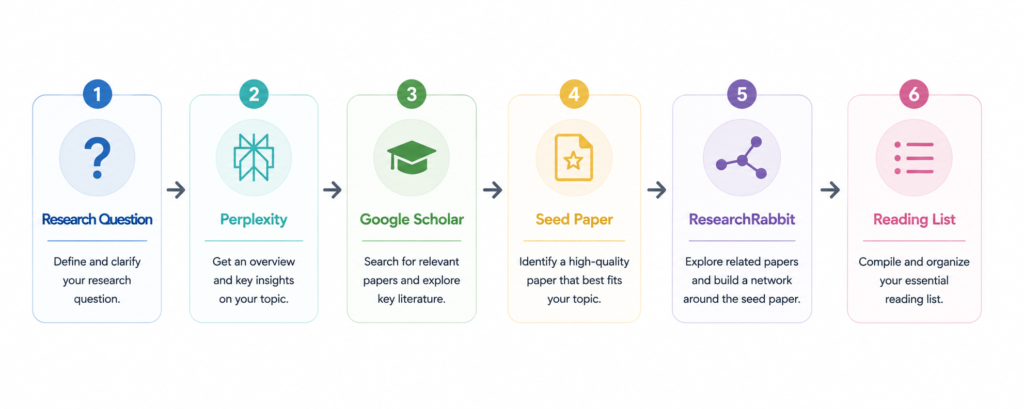
Quick Answer
How to find research papers efficiently is not about trying more keywords.
It’s about building a workflow.
Experienced researchers rarely discover the best papers through endless searches alone. Instead, they begin by understanding the topic, identify one or two landmark papers, and then expand the literature through citation networks rather than repeatedly refining search terms.
The goal isn’t to collect more papers.
It’s to build a reading list you’ll actually read.
Why Finding Good Papers Is Harder Than It Looks
Most researchers don’t struggle because there aren’t enough papers.
They struggle because there are far too many.
A simple search in Google Scholar can return thousands of results within seconds. At first, that feels like an advantage. In practice, it creates a different problem.
Where should you begin?
Which papers are foundational?
Which studies can safely be ignored?
Finding papers is only the beginning.
The harder part is deciding which ones are actually worth your time.
I’ve found that this is where many literature reviews become unnecessarily slow.
I’ve found that many researchers spend far too long refining keywords when the real problem is that they haven’t found the right first paper yet.
This guide explains the workflow I use to build a literature collection—from understanding a new topic to finding the papers that genuinely matter.
Before You Search for Papers
Before I open Google Scholar, I try to answer three simple questions.
- ✅ What research question am I trying to answer?
- ✅ What topic am I actually exploring?
- ✅ What information am I hoping to find?
Those questions shape every search that follows.
If I’m looking for background knowledge, I search very differently than when I’m trying to identify a landmark paper or evaluate a specific experimental method.
Without a clear objective, it’s surprisingly easy to spend an hour searching, download twenty PDFs, and realize later that only two of them were actually useful. I’ve done that more than once.
A focused question almost always produces a better literature search than a longer list of keywords.
A clear research question is usually more valuable than a long list of keywords.
How to Find Research Papers Faster: The Discovery Workflow
One of the biggest misconceptions about literature searches is that they begin with keywords.
In my experience, they begin with understanding.
Once I understand the topic, finding the right papers becomes much easier because I know what I’m actually looking for.
This is the workflow I come back to almost every time I start a new literature review.
Research Question
        ↓
Perplexity
        ↓
Google Scholar / PubMed
        ↓
Landmark Paper
        ↓
ResearchRabbit
        ↓
Reading List
        ↓
NotebookLM
Each step answers a different question. I’ve found that asking the right question at each stage makes the search much more efficient.
| Stage | Question |
|---|---|
| Perplexity | What do I need to understand before searching the literature? |
| Google Scholar / PubMed | Which papers should I begin with? |
| Landmark paper | Which study should become my starting point? |
| ResearchRabbit | What important papers am I still missing? |
| Reading list | Which papers are worth reading in depth? |
| NotebookLM | How do these papers connect once I’ve read them? |
Notice what this workflow does differently.
It doesn’t encourage endless keyword searches.
Instead, each stage builds naturally on the one before it.
Once I understand the topic, I can identify stronger search terms.
Once I find one paper I trust, the rest of the search usually becomes much easier.
By the time I open NotebookLM, I’ve already built a reading list that is focused enough to be genuinely useful.
Experienced researchers rarely build a literature review one keyword at a time. They build it one good paper at a time.
Step 1: Understand the Topic (Perplexity)
The fastest literature search usually begins before you search for a single paper.
It begins by understanding the topic.
When I’m exploring an unfamiliar field, I don’t start with Google Scholar.
I first try to understand the basic concepts, the terminology researchers use, and the questions the field is trying to answer.
That’s where I usually begin with Perplexity.
Instead of searching dozens of websites, I can build enough background knowledge to recognize which papers are likely to matter once I move to the scientific literature.
My workflow is usually very simple.
Research Question
        ↓
Terminology
        ↓
Review Articles
        ↓
Background Knowledge
By the time I open Google Scholar, I already know the keywords, the important concepts, and the language researchers use in the field.
That changes the way I search. Instead of guessing keywords, I already know what I’m looking for.
When NOT to use Perplexity
Perplexity is useful for building background knowledge.
It is not where I evaluate scientific evidence or decide which conclusions are trustworthy.
Once I understand the topic, I move to primary literature.
Background understanding comes before literature discovery.
Step 2: Find One Landmark Paper (Google Scholar / PubMed)
Once I understand the topic, I stop trying to learn about the field and start looking for the first paper that deserves my attention.
I don’t try to find fifty papers. I try to find one.
In my experience, that first paper often determines how efficient the rest of the literature search will be.
Sometimes it’s a review paper. Sometimes it’s one landmark study that everyone in the field seems to cite. Either one is enough to get started.
That first paper becomes my seed paper. Everything else grows naturally from there.
A simple workflow looks like this:
Google Scholar / PubMed
        ↓
Seed Paper
        ↓
Landmark Study
        ↓
Literature Expansion
I’ve found that spending an extra ten minutes identifying a strong seed paper often saves hours of unnecessary searching later.
Once you have one paper you trust, the rest of the literature becomes much easier to discover.
One good paper is usually worth more than twenty search queries.
Step 3: Expand the Literature (ResearchRabbit)
Finding the first paper is only the beginning.
The next challenge is making sure you haven’t missed the rest of the important literature.
This is where ResearchRabbit becomes useful.
Rather than asking me to invent new keyword combinations, it expands the literature around papers I’ve already identified.
Instead of thinking,
What should I search for next?
I’m asking,
What important papers am I still missing?
The workflow typically looks like this:
Landmark Paper
        ↓
Citation Network
        ↓
Related Authors
        ↓
Reading List
Some of the most useful papers I’ve read were never found through keyword searches. I found them because they were connected to one paper I already trusted.
When NOT to use ResearchRabbit
ResearchRabbit works best once you’ve identified a strong starting paper.
If you don’t have a reliable seed paper yet, you’ll usually make faster progress by spending more time in Google Scholar or PubMed first.
ResearchRabbit works best after you’ve found your first important paper.
Step 4: Decide Which Papers Are Worth Reading
A long reading list is not the goal.
A useful reading list is.
By this stage, I usually have more papers than I can realistically read.
Now the task changes from finding papers to choosing papers.
I don’t begin by reading every paper from beginning to end.
Instead, I screen them in a consistent order.
Title
      ↓
Abstract
      ↓
Figures
      ↓
Worth Reading?
      ↓
NotebookLM
If the title and abstract suggest the paper is relevant, I move directly to the figures.
The figures tell me whether the study is likely to answer my research question.
Only the papers that survive this process become part of my detailed reading list.
Everything else can wait.
That simple habit has probably saved me more time than any search tool I’ve used.
If you’d like to see this reading strategy in more detail, I’ve written a separate guide on How to Read Scientific Papers Efficiently, where I explain exactly how I approach abstracts, figures, methods, and discussions.
Real Literature Search Example
This is almost exactly how I start a literature review on an unfamiliar topic.
I don’t begin by searching for dozens of papers.
I begin by understanding the field.
A typical workflow looks like this:
Perplexity
        ↓
Google Scholar
        ↓
Review Paper
        ↓
Landmark Study
        ↓
ResearchRabbit
        ↓
Reading List
        ↓
NotebookLM
First, I use Perplexity to understand the terminology and identify the major questions researchers are trying to answer.
Once I have enough background knowledge, I move to Google Scholar to find a high-quality review paper and one landmark study that researchers cite frequently.
Once I have one paper I trust, the rest of the search usually becomes much easier.
From there, ResearchRabbit helps expand the literature through citation networks and related authors rather than additional keyword searches.
By the time I open NotebookLM, I already have a focused reading list instead of a folder full of unrelated PDFs.
By that point, the search is over.
Now the real work begins.
Common Literature Search Mistakes
The biggest mistake isn’t using the wrong search tool.
It’s searching without a clear strategy.
❌ Searching forever
Why it’s a problem
I’ve made this mistake myself. It’s surprisingly easy to spend an hour refining keywords without getting any closer to the papers that actually matter.
More searching doesn’t always produce better papers.
Better approach
Find one strong paper first.
A good seed paper usually leads to dozens of additional studies through citations and related literature.
❌ Using too many keywords
Why it’s a problem
Adding more keywords often narrows the search without improving it.
It can also cause important papers to disappear simply because they use different terminology.
Better approach
Start with a clear research question.
Once you’ve found one relevant paper, let the literature guide the next search rather than constantly rewriting your keywords.
❌ Ignoring review papers
Why it’s a problem
Primary studies rarely explain the broader context.
Without that background, it’s much harder to recognize which papers are truly important.
Better approach
Begin with one or two high-quality review papers.
They provide the terminology, concepts, and historical context that make the rest of the literature easier to navigate.
❌ Letting AI replace the literature search
Why it’s a problem
AI tools can help researchers discover papers, organize reading lists, and explain unfamiliar concepts.
They should not decide which studies deserve scientific trust.
Better approach
Use AI to make literature discovery more efficient.
Use your own judgment to decide which papers belong in your literature review.
Which Tool Should You Use?
Every tool answers a different research question.
The best workflow isn’t built around one platform.
It’s built around choosing the right tool for the task in front of you.
| Goal | Best Tool |
|---|---|
| Learn a new topic | Perplexity |
| Find landmark papers | Google Scholar / PubMed |
| Expand the literature | ResearchRabbit |
| Read and organize papers | NotebookLM |
| Compare evidence | Elicit |
| Verify citation context | Scite |
| Improve scientific writing | Claude |
Experienced researchers don’t rely on one tool from start to finish.
They move between tools as the research question evolves.
Key Takeaways
- Don’t begin with endless keyword searches.
- Build your literature review around one strong seed paper.
- Review papers often provide the fastest path to understanding a new field.
- ResearchRabbit expands good literature—it doesn’t replace the discovery process.
- AI can accelerate literature discovery, but scientific judgment remains the researcher’s responsibility.
Frequently Asked Questions
What is the fastest way to find research papers?
Start with a clear research question, identify one high-quality review paper, and use it to find a strong seed paper before expanding the literature.
Should I use Google Scholar or PubMed?
It depends on your field. Google Scholar covers a broad range of scholarly literature, while PubMed is the standard database for biomedical research. Many researchers use both during the same literature search.
What is a landmark paper?
A landmark paper is a study that has had a substantial influence on a field and often serves as a starting point for understanding later research. Citation counts alone do not determine whether a paper is a landmark.
What is a seed paper?
A seed paper is the first high-quality paper you intentionally use to build your literature search. It provides the foundation for discovering related studies through citations, references, and author networks.
Is ResearchRabbit better than Google Scholar?
They solve different problems. Google Scholar helps you find the first important paper. ResearchRabbit helps you discover what comes next.
Can AI find research papers?
Yes.
AI tools can support literature discovery and background research. Researchers should still evaluate relevance and scientific quality themselves.
Should I read review papers first?
In most cases, yes.
Review papers provide the background knowledge and terminology that make primary studies much easier to understand.
How many papers should I collect before reading?
There is no fixed number. Start with a focused collection of high-quality papers and expand your reading as your understanding of the topic develops.
Final Thoughts
Finding better research papers isn’t about searching harder.
It’s about knowing which paper should become your starting point.
Further Reading
If you’d like to improve your literature discovery workflow, the following official resources are worth exploring:
- Google Scholar — Academic literature search
- PubMed — Biomedical literature database
- ResearchRabbit — Literature discovery and citation network exploration