Last updated: July 2026
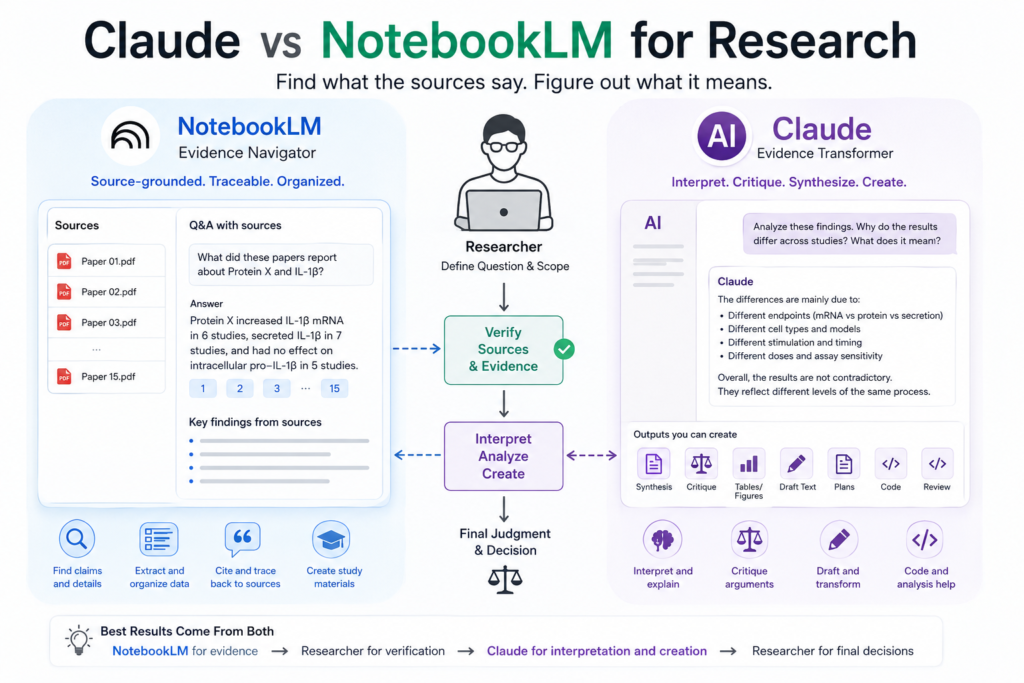
Claude and NotebookLM can both help researchers work with papers.
They are not built for exactly the same job.
NotebookLM is most useful when you need to stay close to a defined set of sources. It can help locate information, organize papers, and trace an answer back to the documents in your workspace.
Claude is more useful when the task moves beyond retrieval. It can help critique an argument, compare explanations, restructure verified evidence, review code, or turn research notes into a draft.
A practical way to remember the difference is:
NotebookLM helps you find what the sources say. Claude helps you work out what those findings may mean.
Or, more simply:
NotebookLM is an evidence navigator. Claude is an evidence transformer.
Neither tool should decide what the evidence ultimately proves.
Contents
- The Real Difference: Retrieval, Interpretation, and Creation
- Source Grounding Helps—but Does Not Guarantee Accuracy
- Reading One Research Paper
- Comparing Multiple Papers
- Literature Reviews and Research Gaps
- Scientific Writing
- Journal Club and Study Work
- Code and Data Work
- A Complete Combined Research Workflow
- Where Each Tool Can Fail
- Privacy, Citations, and Product Changes
- Which One Should You Choose?
The Short Answer
| Research task | Better starting tool | Why |
|---|---|---|
| Locate a claim in supplied papers | NotebookLM | Source-linked retrieval |
| Summarize a fixed paper set | NotebookLM | Bounded source workspace |
| Build a preliminary evidence table | NotebookLM | Easier traceability |
| Explain conflicting findings | Claude | More flexible synthesis |
| Critique a scientific argument | Claude | Better suited to open-ended reasoning |
| Draft from verified notes | Claude | Stronger transformation workflow |
| Create source-based study materials | NotebookLM | Grounded learning outputs |
| Review code or analysis logic | Claude | Broader coding and reasoning support |
| Establish a field-wide research gap | Neither alone | Requires wider searching and verification |
| Make a final scientific conclusion | Neither alone | Requires researcher judgment |
The better choice depends on where you are in the research process.
Source-grounded extraction
          ↓
NotebookLM
          ↓
Researcher verification
          ↓
Claude interpretation or drafting
          ↓
Researcher approval
A 30-Second Example
Imagine that you have 15 papers about whether Protein X increases or suppresses IL-1β production.
At first, the papers appear to disagree.
One reports higher IL-1β mRNA.
Another reports unchanged intracellular pro–IL-1β.
A third reports greater secreted mature IL-1β.
NotebookLM can help you extract the factual details from those papers:
- cell type;
- experimental model;
- stimulus;
- time point;
- assay;
- measured endpoint;
- direct result;
- stated limitation;
- supporting passage.
After you verify the table, Claude can help ask a different question:
Are these studies genuinely contradictory, or are they measuring different biological levels?
The answer may be that the papers are not testing the same endpoint.
That distinction captures the most useful division of labour:
NotebookLM organizes the evidence. Claude helps analyze the relationships within verified evidence.
The Real Difference: Retrieval, Interpretation, and Creation
Asking which tool is “smarter” is usually less helpful than identifying the type of work you need done.
Retrieval asks:
Where does the source say this?
This includes locating:
- a reported result;
- a methodological detail;
- a stated limitation;
- an exact definition;
- the passage supporting a claim.
NotebookLM is often the better starting point because its workflow is organized around a selected source collection.
Extraction asks:
What did each study report?
Useful extraction fields include:
- model;
- intervention;
- dose;
- timing;
- control;
- endpoint;
- assay;
- direct result;
- stated interpretation;
- limitation.
Extraction should remain factual.
Its purpose is not to explain why the result occurred.
Interpretation asks:
What might the results mean?
This includes asking:
- Why do two papers appear to disagree?
- Are they measuring the same biological level?
- Does the design support causality?
- What alternative explanation remains?
- What follow-up experiment would distinguish two hypotheses?
Claude is often more useful here because the task requires flexible reasoning.
Creation asks:
How can verified information become a useful output?
This may involve:
- drafting a synthesis;
- reorganizing an argument;
- preparing a reviewer response;
- creating an experimental plan;
- turning an evidence table into a Discussion section.
Claude is generally more naturally suited to these transformations.
Verification asks:
Does the output match the source and the science?
This remains the researcher’s job.
| Task type | Core question | Best starting point |
|---|---|---|
| Retrieval | Where does the source say this? | NotebookLM |
| Extraction | What did each study report? | NotebookLM |
| Interpretation | Why might the results differ? | Claude |
| Critique | Is the claim broader than the evidence? | Claude |
| Creation | How can verified notes become a draft? | Claude |
| Verification | Does the output remain accurate? | Researcher |
Facts first. Mechanisms second.
Source Grounding Helps—but Does Not Guarantee Accuracy
Source grounding reduces the distance between an answer and the underlying documents.
That is useful when you need to know:
- which paper reported a result;
- where a method was described;
- whether a limitation appears in the source;
- which passage supports a statement.
A linked citation also makes an answer easier to inspect.
But source grounding can still fail.
A grounded answer may:
- omit an important exception;
- misunderstand a sentence;
- merge findings from separate papers;
- attach a citation to wording broader than the passage;
- miss information contained in a difficult table or figure.
A citation improves traceability.
It does not automatically prove accuracy.
Quick rule: Open the cited passage. Do not accept a claim simply because a citation is present.
Claude creates a different kind of risk.
Its open-ended reasoning can produce a coherent explanation that is scientifically plausible but unsupported by the supplied evidence.
The danger is not always an obviously incorrect answer.
It is an explanation that sounds complete before the question has actually been resolved.
Reading One Research Paper
The two tools become useful at different moments.
Start with NotebookLM when navigation is the problem
NotebookLM may be helpful when:
- the paper is long;
- you need to find exact sections;
- you want source-linked notes;
- you are extracting predefined fields;
- you expect to return to the paper repeatedly.
A useful request is:
Using only this paper, identify the research question, experimental model, intervention, control, primary endpoint, direct findings, and stated limitations. Cite the relevant passage for each item. Write “Not reported” when information is missing.
This turns the paper into a structured map.
It does not remove the need to inspect the figures, legends, Methods, and numerical results yourself.
Move to Claude when the logic is the problem
Once the factual structure is clear, Claude can help examine:
- why each experiment was performed;
- which result gives the strongest support;
- which result is indirect;
- whether the Discussion goes beyond the data;
- what alternative interpretation remains.
A useful request is:
Explain how each experiment contributes to the main conclusion. Separate direct evidence, author interpretation, and remaining uncertainty. Do not introduce mechanisms that are not tested in the paper.
A summary helps you navigate a paper.
It is not the paper itself.
Comparing Multiple Papers
Paper comparison is where the distinction between extraction and interpretation becomes especially important.
First, standardize the evidence
Use the same fields for every study:
- model;
- species or population;
- stimulus or intervention;
- dose;
- timing;
- control;
- endpoint;
- assay;
- direct result;
- stated mechanism;
- limitation.
NotebookLM can help build a preliminary table from a selected paper set.
Every important row still needs manual verification.
Then examine the disagreement
After the table has been checked, Claude can help identify whether the apparent disagreement is associated with:
- different species;
- different cell types;
- different doses;
- different time points;
- different stimulation conditions;
- different assays;
- different levels of measurement.
For example, these are not interchangeable:
- IL-1β mRNA;
- intracellular pro–IL-1β;
- mature IL-1β;
- secreted IL-1β;
- downstream inflammatory activity.
A useful request is:
Using only the verified table, first list the factual design and measurement differences. Then suggest possible explanations. Label every explanation not directly supported by the sources as “Hypothesis.”
The correct order is:
Define comparison fields
          ↓
Extract from sources
          ↓
Verify every row
          ↓
Compare study design
          ↓
Interpret disagreement
Do not begin with a mechanism.
First determine whether the studies performed comparable experiments.
Literature Reviews and Research Gaps
Neither Claude nor NotebookLM can conduct an entire formal literature review by itself.
They can support different stages.
Working with a selected paper set
NotebookLM may help:
- organize included papers;
- locate relevant passages;
- create preliminary evidence notes;
- compare predefined variables;
- identify recurring topics or limitations.
Claude may then help:
- group verified findings into themes;
- examine the logic of a synthesis;
- identify tensions between studies;
- draft from a checked evidence table;
- improve structure and transitions.
What remains outside both tools
A formal literature review may still require:
- appropriate database selection;
- reproducible search strings;
- search dates;
- inclusion and exclusion criteria;
- deduplication;
- documented screening;
- quality assessment;
- transparent synthesis.
Uploading a folder of papers does not establish that the folder represents the field.
Be careful with research gaps
Suppose no uploaded paper examines a particular mechanism.
A supported statement is:
This mechanism was not examined in the supplied source set.
An unsupported statement is:
No studies have investigated this mechanism.
A gap in your collection is not necessarily a gap in the literature.
NotebookLM may reveal source-set gaps.
Claude may help convert those observations into candidate questions or experiments.
Neither can establish novelty without broader searching and expert judgment.
A plausible research idea is not automatically a novel research idea.
Scientific Writing
Scientific writing works best when evidence collection and prose generation are separated.
Build evidence-supported notes first
Use a source-grounded workspace to collect:
- source-specific findings;
- supporting passages;
- stated limitations;
- methodological differences;
- preliminary citation notes.
Before drafting, check whether each note accurately represents the original paper.
Transform only verified notes
Claude can help:
- draft from an outline;
- restructure paragraphs;
- improve transitions;
- revise tone;
- prepare reviewer responses;
- turn a comparison table into a narrative.
A safer writing workflow is:
NotebookLM
Collect source-supported notes
          ↓
Researcher
Verify claims and citations
          ↓
Claude
Transform verified notes into a draft
          ↓
Researcher
Check meaning, evidence, and references
After drafting, ask:
- Did certainty increase?
- Did association become causation?
- Does each citation support the whole sentence?
- Was a limitation removed?
- Was an unsupported mechanism added?
- Did a narrow finding become a general conclusion?
Good scientific writing makes the evidence clearer.
It should not make the evidence sound stronger.
Journal Club and Study Work
For journal club preparation, divide factual orientation from critical discussion.
Source-based preparation
NotebookLM may help generate:
- structured summaries;
- glossaries;
- review questions;
- topic maps;
- source-based study materials.
These outputs can help with orientation.
They should not replace direct reading when the discussion depends on exact values, figures, Methods, or statistical details.
Critical discussion
Claude may help formulate questions such as:
- Which experiment is most decisive?
- Which control is missing?
- Does the paper establish mechanism or association?
- What alternative interpretation remains?
- What experiment would challenge the proposed model?
A practical division is:
Use NotebookLM to ask:
- What did the paper report?
- Where is the supporting passage?
- Which limitations did the authors state?
Use Claude to ask:
- Which conclusion may be broader than the evidence?
- What alternative explanation remains?
- Which follow-up experiment would be most informative?
The researcher determines whether the criticism is scientifically justified.
Code and Data Work
Claude is the more natural starting point when the task requires code explanation, transformation, or reasoning.
It may help:
- explain unfamiliar code;
- identify hard-coded assumptions;
- review preprocessing logic;
- flag possible data leakage;
- suggest diagnostic checks;
- draft analysis documentation.
A useful request is:
Review this script for possible errors, hidden assumptions, and reproducibility risks. Do not rewrite it yet. Explain what should be checked manually.
NotebookLM may be helpful when the work is documentation-centered, such as organizing:
- software manuals;
- protocols;
- analysis plans;
- code documentation;
- standard operating procedures.
Neither should be treated as the final authority for:
- complex statistical models;
- difficult model diagnostics;
- regulatory analyses;
- high-stakes clinical decisions;
- final validation of raw-data analysis.
A Complete Combined Research Workflow
Suppose 15 papers appear to disagree about whether Protein X promotes or suppresses IL-1β production.
Use the tools in stages.
Step 1: Define the fields yourself
Decide what must be compared:
- cell type;
- model;
- stimulus;
- dose;
- time point;
- endpoint;
- assay;
- direct result;
- stated mechanism;
- limitation.
This prevents the tool from deciding what evidence matters before you have defined the question.
Step 2: Extract with NotebookLM
Ask for source-linked information using the predefined fields.
Keep distinct endpoints separate.
Do not group mRNA, intracellular protein, processing, secretion, and functional outcomes under one broad label.
Step 3: Verify manually
Check:
- the exact endpoint;
- experimental model;
- dose and timing;
- sample size;
- source passage;
- figure and legend;
- whether the result is direct or interpreted.
Step 4: Interpret with Claude
Use the verified table.
A useful prompt is:
Which apparent contradictions can be explained by differences in model, stimulus, timing, assay, or measurement level? Separate source-supported explanations from new hypotheses.
Claude may identify that the papers captured different stages of the same biological process.
That possibility still needs to be checked against the original studies.
Step 5: Approve the output yourself
Ask:
- Were different endpoints merged?
- Did association become causation?
- Was one cell type generalized to another?
- Was a mechanism added without evidence?
- Was a source-set gap described as a field-wide gap?
Then decide:
- which explanation is supported;
- which remains hypothetical;
- which claim belongs in the manuscript;
- which question requires another experiment.
The final workflow is:
NotebookLM
Navigate and extract evidence
          ↓
Researcher
Verify the source
          ↓
Claude
Interpret, critique, or transform
          ↓
Researcher
Approve the final scientific output
This is more reliable than asking one tool to retrieve, interpret, and write everything in a single step.
Where Each Tool Can Fail
NotebookLM
NotebookLM may:
- miss an important passage;
- overcompress a limitation;
- merge findings from separate sources;
- attach a citation to wording that is too broad;
- misunderstand a figure or table.
A carefully organized notebook may also contain an incomplete or biased paper set.
Source grounding improves traceability.
It does not make the source collection complete or the interpretation automatically correct.
Claude
Claude may:
- produce an unsupported mechanism;
- merge different models or endpoints;
- generalize beyond the supplied evidence;
- turn a hypothesis into a conclusion;
- make weak reasoning sound complete.
Control the source boundary explicitly.
Useful labels include:
- Directly supported
- Author interpretation
- Model-generated hypothesis
- Not reported
- Requires verification
Privacy, Citations, and Product Changes
Verify every important citation
For each major claim:
- Open the source.
- Locate the relevant passage.
- Compare the wording with the source.
- Check the values, conditions, and context.
- Confirm that the citation supports the entire claim.
A citation may support only part of a sentence.
Protect confidential material
Take particular care with:
- unpublished manuscripts;
- confidential peer reviews;
- patient information;
- proprietary datasets;
- grant proposals;
- patent-related material.
Technical ability to upload a file does not mean you have permission to upload it.
Recheck product-specific details
Models, features, file limits, integrations, supported source types, plans, and product branding may change.
Which One Should You Choose?
Choose NotebookLM when:
- your source set is already defined;
- traceability is the priority;
- you need to locate claims;
- you are building structured evidence notes;
- you want source-based learning materials.
Choose Claude when:
- verified evidence needs critique or synthesis;
- notes need to become a draft;
- you need coding assistance;
- you are brainstorming experiments;
- the task requires iterative reasoning.
Use both when:
- the project moves from extraction to interpretation;
- source-linked evidence must become a manuscript;
- a paper set requires both organization and critique;
- you want separate checkpoints for evidence and reasoning.
Use neither alone when:
- literature coverage must be comprehensive;
- the conclusion is high stakes;
- confidential data cannot be uploaded;
- exact statistical validation is required;
- the final decision depends on specialist judgment.
The most useful summary is:
NotebookLM is the better evidence navigator. Claude is the better evidence transformer. The researcher remains the verifier and decision-maker.
Frequently Asked Questions
Is Claude or NotebookLM better for research?
NotebookLM is usually the better starting point for locating and organizing information within a defined source set. Claude is usually better when verified information needs to be interpreted, critiqued, transformed, or drafted.
Is NotebookLM more accurate than Claude?
There is no universal answer. NotebookLM may offer stronger traceability for source-based questions, while Claude may be more useful for open-ended synthesis. Both can produce errors.
Which is better for reading and comparing research papers?
NotebookLM is useful for locating passages and building consistent extraction tables. Claude is useful after the evidence has been verified and the researcher wants to analyze experimental logic or explain differences between studies.
Which is better for literature reviews?
Both can support parts of the process. Neither replaces a reproducible search strategy, screening process, quality assessment, and manual source verification.
Which is better for scientific writing?
Claude is generally more naturally suited to drafting and restructuring verified material. NotebookLM can help collect source-supported notes before drafting.
Can either tool identify a research gap?
NotebookLM may reveal a gap in a supplied source set. Claude may turn that observation into a candidate research question. Neither can establish a field-wide gap without broader searching.
Can NotebookLM hallucinate or misread sources?
Yes. It may omit, merge, misread, or overstate source content. Citations make the answer easier to check but do not guarantee accuracy.
Can Claude stay within uploaded documents?
It can be instructed to use only supplied documents. The source boundary should be explicit, and important claims still need manual verification.
Can Claude review research code?
It may help identify coding problems and reproducibility risks. It should not independently determine that a statistical analysis is scientifically valid.
Should I use Claude and NotebookLM together?
They can work well together when the roles are clear: NotebookLM for evidence navigation and extraction, Claude for interpretation and transformation, and the researcher for verification and final judgment.
Can I upload unpublished research?
Do not assume that uploading is allowed. Check institutional policy, collaboration agreements, confidentiality requirements, consent, and current product terms.
Key Takeaways
NotebookLM is strongest when the task requires source-grounded retrieval and traceability.
Claude is strongest when verified evidence needs interpretation, critique, transformation, or drafting.
Source grounding makes mistakes easier to inspect but does not eliminate them.
Flexible reasoning is useful only when facts, interpretations, and hypotheses remain clearly separated.
Neither tool replaces comprehensive searching, manual verification, or scientific judgment.
NotebookLM can help you find what the sources say. Claude can help you think about what those findings mean. Neither can decide what the evidence ultimately proves.
Continue Learning
AI Tool Comparisons
- Claude vs ChatGPT for Research
- Claude vs Gemini for Scientific Writing
- Best AI Tools for Researchers